
AI itinerary customization is the process of using artificial intelligence to generate travel plans tailored to your unique preferences, travel style, and constraints. This ai itinerary customization guide covers everything from gathering the right inputs to refining your prompts and verifying your final plan. The best results come from treating AI as a collaborative planning partner, not a one-shot answer machine. AI tools synthesize multiple tasks into one workflow, saving around 30 minutes on a week-long trip. That time savings compounds fast when you're planning complex, multi-destination trips.
What do you need before customizing an AI itinerary?
The quality of your personalized travel itinerary depends almost entirely on the quality of your inputs. Vague requests produce generic plans. Specific, detailed inputs produce plans that actually fit your trip.

The six inputs that matter most
Before you open any AI tool, gather these six pieces of information:
- Destination and dates. Include the exact city or region and your travel window. "Europe in summer" is too broad. "Lisbon, Portugal, June 14–21" gives the AI something to work with.
- Travel style. Are you a slow traveler who prefers two or three activities per day, or a fast-paced explorer who wants to pack in as much as possible?
- Interests. Food, history, outdoor adventure, nightlife, art, family-friendly attractions. The more specific, the better.
- Budget. A daily per-person budget helps the AI filter accommodation, dining, and activity options. Budget estimates should include a 25% buffer to cover unexpected costs.
- Group type. Solo traveler, couple, family with young kids, or a group of friends. Each group has different needs. Planytera, for example, supports group trip planning with collaborative features built specifically for families and groups.
- Constraints. Dietary restrictions, mobility limitations, activities to avoid, and any fixed commitments like a wedding or conference.
Choosing the right type of AI tool
AI itinerary tools vary significantly by depth. Consumer tools focus on generating itinerary drafts quickly. Professional platforms handle document parsing and multi-source booking consolidation. For most travel enthusiasts, a consumer-grade AI planning tool with good customization options is the right starting point. Planytera sits in this space, generating tailored day-by-day plans that incorporate dietary requirements, pace, and budget without requiring you to manage spreadsheets.
| Input category | What to prepare | Why it matters |
|---|---|---|
| Destination and dates | City, region, exact travel window | Anchors the entire plan |
| Travel style and pace | Activities per day, rest preferences | Prevents over-scheduling |
| Interests | Specific themes and activity types | Filters irrelevant suggestions |
| Budget | Daily per-person spend | Aligns recommendations to reality |
| Group type | Solo, couple, family, group | Shapes activity and logistics choices |
| Constraints | Diet, mobility, must-avoids | Removes unsuitable options |
How do you craft effective AI prompts for a personalized itinerary?
The quality of AI itinerary outputs relies heavily on prompt engineering. Prompt engineering is simply the practice of writing clear, structured instructions that guide the AI toward useful answers. Most travelers skip this step and wonder why their itinerary feels generic.
What a strong prompt looks like
A weak prompt: "Plan a trip to Japan for 10 days."
A strong prompt: "Create a 10-day Japan itinerary for two adults. We prefer a moderate pace with two to three activities per day. We're interested in food culture, traditional temples, and day hikes. Our budget is $150 per person per day, excluding flights. We're vegetarian. Avoid crowded tourist traps. Start in Tokyo, then move to Kyoto and Hiroshima."
The difference is specificity. Providing specific constraints like dietary restrictions allows the AI to filter out irrelevant options and suggest more personalized activities. Every constraint you add narrows the output toward something genuinely useful.
Prompt structures for different travel styles
- Adventure traveler: "Include at least one outdoor activity per day. Prioritize hiking, kayaking, and cycling routes. Suggest gear rental locations where relevant."
- Food-focused traveler: "Center each day around a meal experience. Include one local market visit, one street food stop, and one sit-down restaurant per day. Flag any Michelin-recognized spots."
- Family with young kids: "Keep daily activity time under five hours. Include at least one child-friendly attraction per day. Note bathroom and rest stop availability."
- Solo traveler on a budget: "Prioritize free or low-cost attractions. Suggest hostels or guesthouses under $40 per night. Include tips for safe solo travel in each area."
Pro Tip: Ask the AI to generate separate detailed itineraries for each city in a multi-destination trip rather than one large plan. City-by-city itineraries are significantly more focused and practical than a single vague overview.
Iterating on your first output
AI travel planning works best as an ongoing conversational process. Your first output is a draft, not a final plan. After reviewing it, ask follow-up questions: "Can you replace Day 3's afternoon activity with something indoors?" or "Are there any evening food markets near the Day 5 hotel?" Each refinement round produces a more tailored result.
Step-by-step process to generate and refine your AI travel itinerary
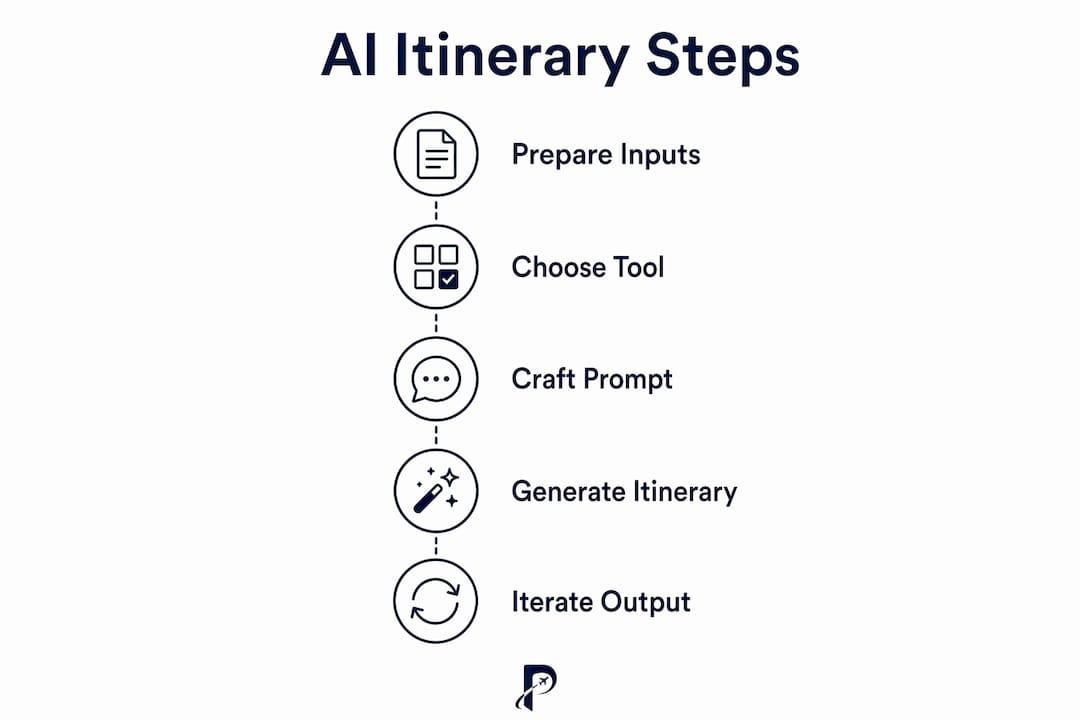
A practical workflow turns a rough AI draft into a trip plan you can actually use. Follow these steps in order.
- Generate the initial draft. Use your prepared inputs and a detailed prompt. Ask for a day-by-day breakdown with morning, afternoon, and evening slots.
- Review for pacing. Check whether the daily schedule feels realistic. A plan that includes four museums and a cooking class in one day is a red flag.
- Ask clarifying questions. Use follow-up prompts to swap activities, adjust timing, or add missing elements like transportation between locations.
- Identify your anchor events. Anchor events like museums or tours with fixed reservations should be booked first. Treat remaining activities as flexible buffers that can shift if needed.
- Verify time-sensitive details. AI-generated itineraries often require verification of opening hours, prices, and booking requirements. AI data can be outdated on these specifics.
- Cross-check logistics. Confirm that travel times between locations are realistic. A 20-minute walk that the AI suggests might actually be 45 minutes with traffic.
- Save multiple versions. Keep your original draft and each revised version. Comparing them helps you spot what improved and what you may have accidentally removed.
Pro Tip: Never book directly through AI-generated outputs. Use the itinerary to identify what to book, then complete reservations through official venue websites or trusted booking platforms.
Planytera's platform supports this workflow natively. You can adjust your itinerary on the fly, access it offline, and use the built-in journal to document changes as your trip evolves. The 2026 planning guide on Planytera's blog walks through this workflow in detail.
What are the most common mistakes in AI itinerary customization?
Even experienced travelers make predictable errors when using AI for trip planning. Knowing what to watch for saves you from arriving somewhere to find it closed, overbooked, or nothing like the description.
The most common pitfalls
- Vague prompts. "Plan a fun trip to Thailand" produces a generic tourist circuit. Add your travel style, interests, and constraints before submitting.
- Trusting outdated information. AI models have training cutoffs. Restaurant closures, attraction renovations, and visa rule changes may not be reflected.
- Unrealistic pacing. AI tends to over-schedule. If a day has more than four major activities, the plan needs editing.
- Skipping verification. Opening hours, entry fees, and reservation requirements change. Always check official sources before committing.
- Booking directly from AI output. AI-generated links and booking suggestions can be inaccurate or outdated. Use the plan as a guide, not a booking engine.
Quick fixes when something goes wrong
- If the itinerary feels rushed, ask the AI to "reduce the pace and add buffer time between activities."
- If suggestions feel generic, add more specific interests to your prompt and ask for a revised version.
- If a recommended venue is closed or unavailable, ask the AI for three alternatives in the same area with similar characteristics.
"The most effective AI trip planning combines AI's strategic capability with human judgment for verification and booking execution. Neither alone produces the best result."
Combining AI efficiency with human oversight is the standard that experienced travelers and professional trip planners follow. AI handles the heavy lifting of research and structure. You handle the judgment calls.
Key Takeaways
The most effective approach to AI itinerary customization combines detailed inputs, iterative prompt refinement, and human verification to produce a personalized, realistic travel plan.
| Point | Details |
|---|---|
| Prepare detailed inputs first | Gather destination, dates, budget, travel style, interests, and constraints before prompting. |
| Use specific, structured prompts | Detailed prompts with constraints produce tailored outputs; vague prompts produce generic plans. |
| Treat the first draft as a starting point | Refine through follow-up questions across multiple rounds for the best results. |
| Book anchor events first | Secure fixed reservations early and keep the rest of the schedule flexible. |
| Always verify time-sensitive details | Check opening hours, prices, and booking requirements through official sources. |
Why I think most travelers underuse AI for trip planning
Most travelers use AI like a search engine. They ask one question, skim the answer, and move on. That approach misses the real value entirely.
The travelers who get the most out of AI planning tools are the ones who treat the process like a conversation with a knowledgeable friend. They push back, ask follow-ups, and test different angles. I've seen itineraries transform from a generic tourist checklist into something genuinely personal after just three or four rounds of refinement. The first draft is almost never the best one.
What surprises most people is how much the input quality matters. Integrating AI with live travel databases marks a real shift from static guidebook recommendations to real-time planning. But even the best platform can't compensate for a vague prompt. The tool is only as good as what you give it.
My honest advice: spend five minutes writing out your travel preferences before you open any AI tool. Use the six-input framework from this guide. That five minutes of preparation will save you an hour of back-and-forth and produce a plan that actually reflects how you travel. You can also explore travel customization trends in 2026 to see where AI planning is heading next.
The future of customized trip planning is not about AI replacing your judgment. It's about AI doing the research so you can focus on the decisions that actually matter to you.
— Dom
How Planytera makes personalized AI trip planning easier
Planning a trip should feel exciting, not exhausting. Planytera generates tailored day-by-day itineraries based on your preferences, pace, budget, and dietary needs, all without the spreadsheets.
Planytera works for solo travelers, couples, families, and groups. You can adjust your plan on the fly, access it offline when you're on the road, and use the built-in journal to capture memories as you go. The platform's live travel guidance keeps your itinerary current even when plans change. If you're ready to build a trip that fits you, start with Planytera and see how fast a personalized itinerary comes together. You can also review the available subscription plans to find the option that fits your travel frequency.
FAQ
What is AI itinerary customization?
AI itinerary customization is the process of using artificial intelligence to generate travel plans based on your specific preferences, constraints, and travel style. The output quality depends directly on the detail and specificity of your inputs.
How do I make my AI travel itinerary more personalized?
Add specific constraints to your prompt, including dietary restrictions, travel pace, interests, and budget. Specific constraints allow AI to filter out generic suggestions and recommend activities that match your actual needs.
Do I need to verify AI-generated travel information?
Yes. AI data can be outdated on time-sensitive details like opening hours, prices, and booking requirements. Always confirm these details through official venue websites or current booking platforms before your trip.
How many times should I refine my AI itinerary prompt?
Refine your prompt at least two to three times. AI travel planning works best as an iterative conversational process, with each round producing a more tailored and realistic plan.
Can AI plan itineraries for groups and families?
Yes. Providing your group type, including ages and shared interests, helps AI tailor activity suggestions, pacing, and logistics. Platforms like Planytera include collaborative planning features designed specifically for families and groups.