
Yes, AI can plan most of your trip workflow, as long as you treat it like a fast, tireless research assistant rather than a booking agent. It's great at the messy middle part of planning: turning "I want to see Portugal in 10 days" into a real day-by-day route. It's much less reliable the moment money changes hands or a date gets locked in.
Here's the quick breakdown of where to lean on AI and where to slow down:
- Trust AI for: brainstorming destinations, drafting skeleton itineraries, sequencing neighborhoods so you're not zigzagging across a city, building packing lists, and rewriting plans when weather or energy levels change.
- Verify manually: live flight and hotel prices, restaurant reservations, visa requirements, opening hours, and anything tied to a fixed date.
- Use for finalizing: once your rough plan is solid, a dedicated artificial intelligence travel planner like Planytera turns it into an editable, shareable itinerary with live guidance, so you're not stuck rebuilding everything in a spreadsheet the night before your flight.
This is the core tension in any honest AI travel planning guide: the technology is genuinely good at structure and genuinely bad at certainty. Once you know which is which, planning a trip gets a lot faster.
Key Takeaways
The most reliable way to plan a trip is pairing AI's speed at structuring itineraries with human verification of anything involving dates, prices, or legal requirements.
| Point | Details |
|---|---|
| Start with constraints | Give AI your dates, budget, travelers, pace, and dislikes before asking for a plan. |
| Build a skeleton first | Get the day-by-day structure locked before adding restaurant and ticket details. |
| Verify every fixed item | Check flights, timed entries, and visa rules against official sources before booking. |
| Match tools to tasks | Use creative models for ideas, fact-focused models for visas, and web-connected models for live pricing. |
| Finalize with Planytera | Turn a verified skeleton into an editable, live-guided itinerary with offline access and collaboration. |
Table of Contents
- Step-by-Step: How to Plan a Trip With AI From Brief to Bookings
- Copy-Paste Prompts You Can Use Right Now
- What Can AI Actually Handle, and What Still Needs a Human Check?
- Which Features Actually Matter in an AI Trip Planner?
- Free vs. Paid: What's the Real Difference in Value?
- How Do You Choose the Right AI Approach for Your Trip?
- How Planytera Builds, Tests, and Validates AI Itineraries
- When I Personally Reach for AI, and When I Don't
- Turn Your AI Draft Into a Trip You Can Actually Take
- Sources
Step-by-Step: How to Plan a Trip With AI From Brief to Bookings
Most people's first mistake when using AI for travel planning is typing "plan me a trip to Italy" and expecting magic. You'll get generic mush. The fix is constraint. Give the model less room to guess, and it gives you a plan you can actually use.
- Write a real trip brief first. Include your dates, budget, number of travelers, departure city, preferred pace (packed vs. relaxed), any dietary or mobility needs, and one clear dislike (no beaches, no early mornings, no more than two museums a day).
- Ask for a skeleton itinerary, not a finished one. Get the day-by-day structure locked before adding restaurant names or timed tickets. Fixing sequencing at the skeleton stage takes two minutes; fixing it after you've built out every detail takes an hour.
- Iterate for detail, then group by neighborhood. Ask the model to reorganize activities geographically so you're not crossing town twice in one afternoon.
- Match the task to the right tool. A creative model is fine for "give me five off-the-beaten-path ideas near Lisbon." For anything involving money or legal status, you want a model connected to live data or a dedicated planner.
- Verify every fixed item before you book. Flights, timed museum entries, and visa rules need a human check against an official source, every time.
Google's Gemini illustrates why the tool matters here: it pulls from Google Maps, Flights, and Hotels and can optionally use your Gmail and Photos through Personal Intelligence to build an itinerary that reflects bookings you've already made. That's a genuinely different capability from a chatbot working off training data alone.
Before you book anything, run through this short checklist:
- Confirm flight prices and seat availability directly on the airline or a booking site.
- Check that timed entries (museums, tours, transit passes) are actually available for your dates.
- Verify visa and entry requirements on your destination's official government site, not a travel blog.
- Cross-check opening days and hours, especially for smaller museums and restaurants that close on odd weekdays.
Independent testing backs this order of operations: hands-on comparisons found AI is strong at building structure and sequencing but unreliable for live prices, opening hours, and reservations, which is exactly why the verification step isn't optional.
Copy-Paste Prompts You Can Use Right Now
You don't need to be a prompt engineer to get good results. You need a template and the discipline to fill in every blank before you hit send.
The constrained trip brief (paste this into any AI, then fill in the brackets):
"Plan a [X]-day trip to [destination] for [number] travelers departing from [city]. Budget is [amount] total/per person. We want a [relaxed/moderate/packed] pace. Must include: [must-haves]. Avoid: [dislikes]. Dietary needs: [needs]. Give me a skeleton itinerary first, organized by day, before adding details."
Once you have the skeleton, use these follow-ups:
- "Group day 3's activities by neighborhood so we minimize travel time."
- "Give me three alternative options for day 2 in case it rains."
- "Rewrite this as a slower-paced, three-day version for a family with young kids."
- "Generate a packing list and a documents checklist based on this itinerary and destination."
- "What visa or entry requirements should I check for this trip?" (then verify the answer independently)
Google's Canvas feature in AI Mode is built around exactly this kind of back-and-forth. It creates a persistent, editable itinerary that saves your history so you can keep refining it, accepts images if you want a similar vibe to a photo you found, and generates a shareable link for group input.
Pro Tip: Always ask for the skeleton before the details. It costs you nothing extra, and it means you're correcting the trip's overall shape while it's still easy to change, not after you've built out ten paragraphs of restaurant recommendations you now have to reorganize by hand.
What Can AI Actually Handle, and What Still Needs a Human Check?
AI travel assistance tools are reliable for a specific set of jobs and shaky for another. Knowing the line between them is the single most useful thing this guide can teach you.
What AI handles well:
- Structuring a multi-day trip into a logical sequence
- Grouping activities geographically to cut down on backtracking
- Generating fresh ideas when you're stuck on where to go
- Building packing lists tailored to climate and activities
- Rewriting a plan on the fly when something falls through
Where AI commonly gets it wrong:
- Live prices for flights, hotels, and tours (these change by the hour)
- Reservation availability for restaurants and timed attractions
- Current opening days and hours, especially seasonal closures
- Visa and entry rules, which vary by nationality and change without much notice
- Local transport timetables, particularly in smaller towns
One review of AI-planned trips found that some tools show real promise but still make mistakes that require human oversight, especially around logistics with a fixed date attached. That lines up with the practitioner rule of thumb: a model can sound completely confident while being wrong about a train departure time, so anything with a date on it gets checked against the operator's own site.
A simple way to catch a likely hallucination: ask two different models the same factual question (a visa rule, an opening day) and see if they agree. If they don't, neither answer is trustworthy until you check an official source. This two-model crosscheck takes thirty seconds and has saved travelers from showing up to a "closed on Mondays" museum more than once.
Which Features Actually Matter in an AI Trip Planner?
Not all best AI travel apps are built the same, and the marketing copy rarely tells you which features are cosmetic and which ones save you real time. Here's what to check before you commit to one.
- Live pricing and booking links. A tool that only guesses at costs is a brainstorming tool, not a planning tool. Test it by asking for a hotel price and comparing it to what you find on a booking site the same day.
- Maps integration. If your itinerary doesn't show you where things actually are relative to each other, you'll end up crisscrossing a city without realizing it.
- Exportable, editable itineraries. You should be able to tweak a day without starting the whole plan over.
- Collaboration and sharing tools. For families or groups, a shareable itinerary that everyone can comment on beats a group text with six screenshots of a chat conversation.
- Offline access. Cell service is not guaranteed, especially outside major cities, and a plan that only works with wifi is a plan that fails you at the worst moment.
- Data privacy controls. Understand what the tool does with your travel dates, destinations, and any personal data you connect.
- A path to human support. Even the best AI benefits from a real person to escalate to when something breaks.
Some tools now connect to your calendar or email to pull in existing bookings automatically. Gemini's Personal Intelligence feature, for instance, can factor in your Gmail and Photos to keep an itinerary updated as you book things. That's a real time-saver, but it means you're trusting a company with meaningful personal data, so read the privacy terms before you connect anything. If personalization and preference-matching interest you beyond calendar syncing, it's worth understanding how AI learns traveler preferences over time.
Free vs. Paid: What's the Real Difference in Value?
Most AI travel assistance tools fall into one of four pricing shapes: a free tier with usage caps, pay-per-trip credits, a monthly subscription, or a team/agency tier built for bulk planning. None of them is automatically "the right one." It depends on how often you travel and how much verification work you're willing to do yourself.
If you take one big trip a year, a free tier or a single trip credit is probably enough. If you're planning trips constantly, whether for yourself, your family, or as part of running group trips, a subscription starts paying for itself the moment it saves you a few hours of manual spreadsheet work. Agencies planning multiple trips for clients need bulk tools and team collaboration features that free tiers simply don't offer.
Before paying for anything, run a real test:
- Use the free tier or trial to plan one actual upcoming trip, start to finish.
- Time how long it takes you compared to your usual method.
- Test whether the exported itinerary is actually usable offline or requires you to rebuild it elsewhere.
- Check how close the tool's price estimates land to what you find on a live booking search.
That last test matters more than it sounds. A tool that consistently lowballs hotel costs by 30% isn't saving you time. It's creating a new verification job you didn't have before.
How Do You Choose the Right AI Approach for Your Trip?
Not every trip needs the same setup. A weekend city break and a three-week multi-country itinerary have very different risk profiles, and matching the tool to the trip keeps you from either over-engineering a simple plan or under-preparing a complicated one.
Ask yourself these questions first:
- How complex is the trip? A single city for four days is low-risk. A six-country, multi-visa itinerary is not.
- How many people are involved? Group trips need collaboration and shared editing more than solo trips do.
- How much time do you have to verify details? If you're booking three months out, you have room to double-check everything. If you're booking next week, you need a tool with live data.
- What does a mistake actually cost you? A wrong restaurant suggestion is annoying. A wrong visa requirement can end your trip at the airport.
- Do you need updates while traveling, or just a plan before you leave?
For a weekend city break, almost any general chatbot will do fine for ideas and rough sequencing, since the stakes are low and you can course-correct easily on the ground. A family trip benefits from a dedicated planner with collaboration features, since you're juggling multiple people's preferences, nap schedules, and dietary needs at once, something covered in more depth in guides on group trip planning for families. A complex multi-city itinerary is where mixed-model workflows earn their keep: use a creative model for brainstorming, a fact-focused model or official source for visas and budgets, and a web-connected tool for live pricing. Business travel usually calls for the hybrid approach outright, pairing AI-drafted itineraries with a live booking platform to lock in the details that actually matter to a client meeting.
This mixing approach isn't a compromise, it's the recommended method. Independent guides testing multiple tools consistently find that no single model dominates every planning task, which is why treating AI as a toolkit rather than a single app tends to produce better trips.
How Planytera Builds, Tests, and Validates AI Itineraries
Generic AI chat is good for ideas. Turning those ideas into a itinerary you can actually travel with, with real timing, real transport legs, and a plan that survives contact with a delayed flight, takes a different level of testing.
Planytera's approach layers structured trip data (destinations, transport times, opening patterns) with human review passes on the resulting itineraries, and cross-checks against live conditions before anything reaches a traveler's phone. That mirrors what corporate travel teams already do: hybrid workflows that pair AI drafting with human or booking-platform confirmation consistently outperform AI-only or human-only planning for anything beyond a simple weekend trip.
Here's what that testing structure typically checks before an itinerary is considered production-ready:
| Testing Stage | What Gets Checked | Why It Matters |
|---|---|---|
| Data sourcing | Destination, transport, and timing data pulled from structured sources | Prevents generic, low-detail suggestions |
| Live-data checks | Pricing and availability spot-checked against current conditions | Catches outdated or hallucinated numbers |
| Human review | Sample itineraries reviewed for logical sequencing and pacing | Confirms the plan is actually walkable/drivable in the time given |
| User testing | Real trips run through the tool and compared to manual planning time | Validates the time savings claim with real usage, not just theory |
A well-built day in a finalized itinerary usually reads something like this:
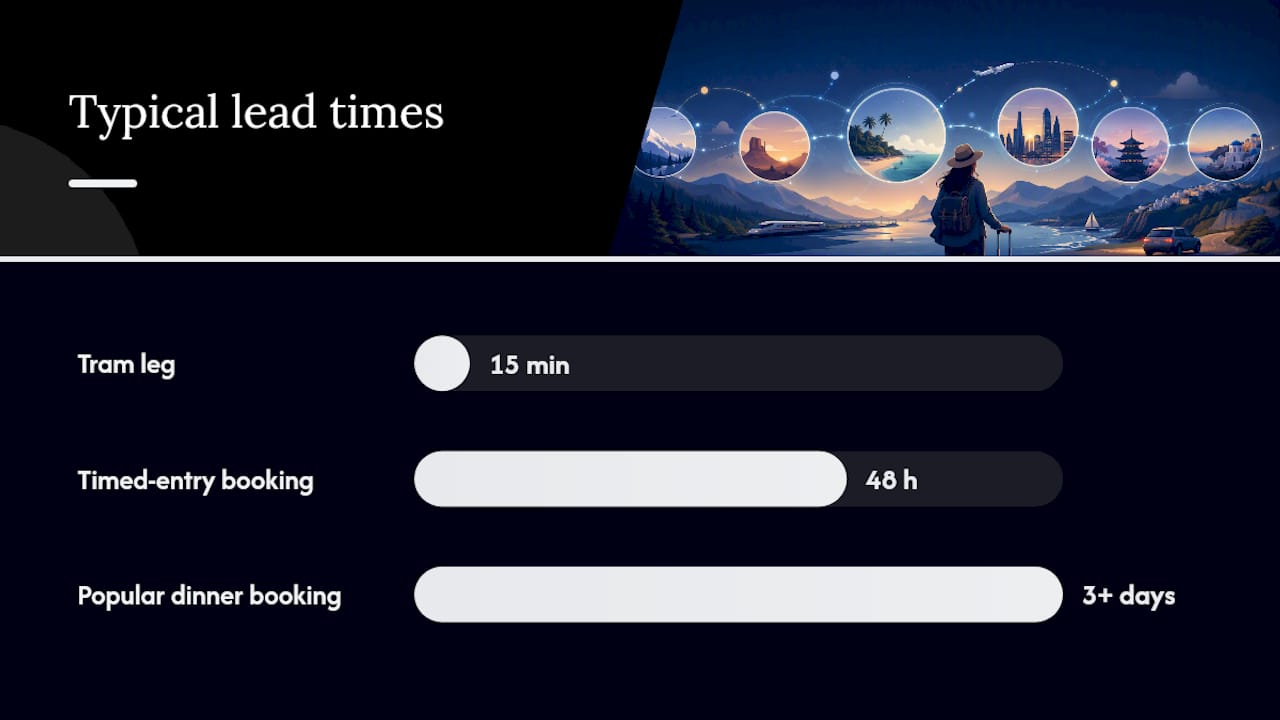
Day 3, Lisbon: Morning at Jerónimos Monastery (book timed entry 48 hours ahead), 15-minute tram to Belém Tower, lunch in the Alcântara district, afternoon free for the LX Factory market, dinner reservation flagged as "book 3+ days ahead, popular spot." Transport legs and walking times included between every block.
Notice the urgency flags on reservations. That detail, telling you which items need booking ahead versus which are flexible, is what separates a genuinely usable itinerary from a wall of text. It's also worth understanding, when you're customizing an AI-built plan, how to edit routes and adjust pacing without breaking the day's logical flow.
On privacy: any tool asking for calendar or email access to auto-update your trip should tell you exactly what it stores and for how long. Read that policy before connecting anything, the same way you would with any app touching personal data.
When I Personally Reach for AI, and When I Don't
The trip where AI actually saved real time for me wasn't a complicated one. It was a five-day trip to a city I'd never visited, and the value wasn't in some brilliant hidden gem the AI suggested. It was in how fast it turned "I have five days and like walking more than museums" into a rough day-by-day shape I could react to. Instead of staring at a blank spreadsheet for an hour, I was editing a draft within ten minutes. That's the real win: AI removes the blank-page problem, not the thinking problem.

Where I still don't trust it, without exception, is anything with a date attached. On that same trip, the draft itinerary suggested a museum visit on a day it turned out to be closed, a detail I only caught because I happened to check the museum's own site out of habit. That's a small mistake with a big lesson: the AI wasn't being careless, it simply didn't have access to that week's actual closure schedule, and it answered confidently anyway. I now check every timed booking, every transit schedule, and every visa claim against an official source, no exceptions, regardless of how detailed or confident the AI's answer sounds.
The practical takeaway isn't "don't trust AI." It's "trust it for the shape of the trip, verify the specifics." That single habit is the difference between a plan that saves you hours and one that costs you a wasted afternoon standing outside a closed building.
Turn Your AI Draft Into a Trip You Can Actually Take
Planytera picks up exactly where the brainstorming and skeleton-building leaves off. Once you've used a chatbot to rough out ideas, Planytera turns that into a fully editable, day-by-day itinerary that accounts for your dietary needs, travel pace, and budget, then keeps it live with real-time guidance and cost estimates as your trip approaches.
Everything stays editable and shareable, so if you're planning with a partner, family, or a larger group, everyone can weigh in on the same plan instead of comparing five different screenshots. Offline access means your itinerary still works when you lose signal, and the built-in trip journal lets you document the trip as it happens instead of trying to remember details weeks later. For travel agencies, bulk planning tools and custom branding handle multiple client trips without rebuilding each one from scratch.
If you've been using a general chatbot for the brainstorming stage, the natural next step is finalizing that plan somewhere built for it. Check out Planytera's subscription plans to see which tier fits how often you travel, or start with the free plan on Planytera to test it on your next trip before you commit to anything.
Sources
Frequently Asked Questions
Can AI actually book my flights and hotels for me? Most AI travel planning tools draft itineraries and suggest options, but final bookings usually happen on airline sites, hotel platforms, or through a connected booking feature. Always confirm price and availability before paying.
Which AI is best for planning a multi-city trip? No single tool wins every task. A practical approach uses a creative model for brainstorming stops, a fact-focused source for visa and budget questions, and a web-connected tool or dedicated planner like Planytera for live pricing and final logistics.
Is it safe to connect my email or calendar to an AI travel planner? It can be convenient, since tools like Gemini can factor in existing bookings from your Gmail, but you should read the privacy policy first and only connect accounts you're comfortable sharing data with.
How do I know if an AI's travel suggestion is wrong? Ask a second model the same factual question and see if the answers match. If they disagree, or if the detail involves a fixed date, verify it against the official source before relying on it.