
Choose an itinerary platform with white-label guest-facing itineraries, PMS/booking-engine sync, pre-arrival links, and an agency dashboard. That combination is the sweet spot for boutique hotels and travel pros who want to deliver a polished, branded guest experience without adding staff hours.
Three benefits you get right away:
- Branded guest experience. Your hotel's logo, tone, and contact details appear on every day-by-day plan the guest sees, not a generic third-party layout.
- Pre-arrival upsell revenue. Guests browse and book amenities, local experiences, and room upgrades before they even check in, turning the pre-arrival window into a revenue channel.
- Reduced manual reconciliation. Reservations sync automatically between the booking engine and the itinerary, so your team spends less time cross-checking spreadsheets.
The short answer: For travel pros and boutique hotel teams, the right itinerary app connects your PMS or booking engine to a white-label guest itinerary, captures preferences before arrival, and surfaces upsells in context. That single setup replaces fragmented reservation spreadsheets with a branded package ready in minutes.
Table of Contents
- Who is this guide for, and what does it cover?
- What features must an itinerary app include for boutique hotel integration?
- How do itinerary app integrations actually work?
- What operational benefits do travel pros and boutique hotels actually see?
- What does implementation actually look like, and what does it cost?
- What should you ask every vendor before you sign?
- Best practices and a real-world example for boutique hotels
- Common integration pitfalls and how to avoid them
- Key Takeaways
- Why this approach works for boutique hotels and travel pros
- Planytera makes boutique hotel itinerary integration practical
- Useful sources for planning your integration
Who is this guide for, and what does it cover?
This guide is written for travel planners, destination management companies (DMCs), boutique-hotel operations and revenue teams, and agency tech leads who are evaluating or implementing itinerary apps that connect tightly with boutique property bookings.
What you'll find here:
- A functional checklist of must-have features for boutique-hotel workflows
- A breakdown of technical integration patterns (PMS/API, channel managers, OTA APIs, webhooks, iCal/vouchers)
- A practical implementation timeline with cost model comparisons
- A vendor evaluation checklist with red flags and RFP questions
- A short case-style example and E-E-A-T best practices
- Troubleshooting guidance for the most common integration failures
What this guide does not cover: large-scale enterprise CRS rewrites, full custom PMS development from scratch, or non-hotel verticals such as cruise lines or vacation rentals. If your project falls into one of those categories, you'll need a more specialized technical engagement.
What features must an itinerary app include for boutique hotel integration?
Travel pros evaluating itinerary apps for boutique properties need a specific set of capabilities. Generic trip-planning apps built for consumers rarely cover the operational and commercial needs of a boutique property. Here's the checklist that actually matters:
- White-label, branded itineraries. The app must support your hotel's logo, color palette, tone of voice, and contact information on every guest-facing plan. Guests should never see a third-party brand name in the experience.
- PMS/booking-engine sync. Real-time room availability, reservation linking, and check-in status updates need to flow directly from your property management system into the itinerary. Itinerary management apps that connect with PMS providers via API or XML are the standard for agencies and boutique properties that need scalability.
- Pre-arrival links and guest preference capture. A pre-arrival link sent before check-in lets guests browse local activities, note dietary needs, and flag accessibility requirements. This builds emotional investment and reliably increases ancillary revenue for boutique properties.
- Upsell and amenity offers. Upsells need to be embedded inside the itinerary itself, not tucked away in a separate email. Booking or voucher flows for spa treatments, airport transfers, or curated dinner reservations should appear in context, tied to the relevant day.
- Collaborative editing and agency dashboard. Multi-user access, group rooming lists, and a shared admin view are non-negotiable for agencies managing several properties or group bookings at once. Planytera's shared itinerary setup covers this workflow in detail.
- Offline access / PWA capability. Guests travel to places with unreliable connectivity. A progressive web app (PWA) or cached offline mode keeps the itinerary accessible regardless of signal strength.
- Real-time updates and two-way messaging. Push notifications for schedule changes, weather alerts, or concierge messages keep guests informed without requiring a phone call. Two-way messaging between the guest and the hotel concierge or travel agent closes the loop.
How do itinerary app integrations actually work?
The industry term for connecting an itinerary platform to a hotel's systems is property connectivity, and it covers several distinct technical patterns. Each one has a different latency profile, data richness, and implementation cost. Choosing the right one depends on your property's tech stack and how much real-time data you actually need.
The five primary integration patterns:
- Native PMS/API integration. A direct connection to your property management system (e.g., Opera, Mews, Cloudbeds). Enables real-time reservation binding, check-in status, and room-type data. Highest data richness, but requires API credentials, data mapping, and sandbox testing.
- Channel manager/CRS sync. Routes through your existing channel manager (e.g., SiteMinder, RateGain). Slightly less direct than a native PMS connection but often faster to implement because the channel manager already normalizes your inventory data.
- OTA-side reservation ingestion. Pulls confirmed reservations from OTA booking confirmations (Booking.com, Expedia) via their APIs. Useful when the property doesn't have a modern PMS, but limited to confirmed bookings with no live availability.
- iCal/voucher import. The lightest-weight option: a booking reference or iCal feed populates the itinerary with dates and property details. No live availability, no real-time updates. Good for a fast pilot or for properties with legacy systems.
- Webhook-driven events. The itinerary platform subscribes to events from the PMS (reservation created, modified, cancelled) and updates the guest itinerary automatically. Combines well with native PMS integration for near-real-time sync.
| Integration Method | Latency | Data Richness | Dev Effort | Best Fit |
|---|---|---|---|---|
| Native PMS/API | Near real-time | High (availability, status, profiles) | Medium-High | Modern boutique hotels with API-ready PMS |
| Channel manager/CRS | 1 min | Medium (rates, availability) | Medium | Properties already using a channel manager |
| OTA reservation ingestion | Batch/near real-time | Low-Medium (confirmed bookings only) | Low-Medium | OTA-heavy properties without modern PMS |
| iCal/voucher import | Manual/periodic | Low (dates, reference only) | Low | Legacy systems or fast pilots |
| Webhook events | Near real-time | High (event-driven updates) | Medium | Properties wanting automated itinerary updates |
Booking management workflows for agencies and hotels illustrate how these patterns fit into day-to-day reconciliation.

Pro Tip: Start with a pre-arrival link or iCal import to prove the guest experience before committing to a full PMS/API integration. A staged approach cuts time-to-value and lets you validate the upsell flow with real guests before the heavier technical work begins.
What operational benefits do travel pros and boutique hotels actually see?
The core return on investment is operational. Integrated itineraries replace fragmented reservation spreadsheets with a single branded package that takes minutes to present to a client, rather than hours of manual assembly.
Primary benefits by role:
- Front desk and concierge: Fewer inbound calls about "what's included" because guests already have a detailed, up-to-date itinerary on their phone. Staff time shifts from answering repetitive questions to handling genuine service requests.
- Revenue manager: Pre-arrival upsell flows tied to room type and stay length create a measurable ancillary revenue channel. AI-driven itinerary tools let hotels convert website visitors into pre-arrival planners and increase upsell opportunities via in-app booking of experiences and amenities.
- Travel agent: Branded, shareable itineraries replace email chains and PDF attachments. The agent presents a polished, interactive plan that reflects their agency's identity, not a generic document.
Common use cases where integration drives the most value:
- Pre-arrival trip building. The guest receives a link 7–10 days before check-in, browses curated local recommendations, and saves activities. The hotel sees preference data before the guest arrives.
- Group rooming lists and itineraries. A DMC managing a 30-person incentive group can assign rooms, build a shared day-by-day schedule, and push updates to all guests simultaneously.
- Last-minute upsell campaigns. A webhook fires when a reservation is confirmed, triggering an automated itinerary with a time-limited spa or dining offer embedded on day one.
- Concierge-recommended local experiences. The best boutique-hotel integrations behave like local guides, with curated, geo-tagged recommendations that reflect the hotel's character rather than generic tourist attractions.
- Agency-managed multi-property itineraries. An agency running clients across three boutique properties in the same city can manage all itineraries from a single dashboard, with each property's branding applied automatically.
Planytera's AI itinerary customization covers how algorithmic personalization adapts to guest preferences at scale, which is particularly useful for agencies handling high volumes of custom travel plans.

What does implementation actually look like, and what does it cost?
Implementation breaks into four phases. The timeline and cost vary significantly depending on whether you're configuring an existing SaaS platform or building a custom integration.
Phase overview:
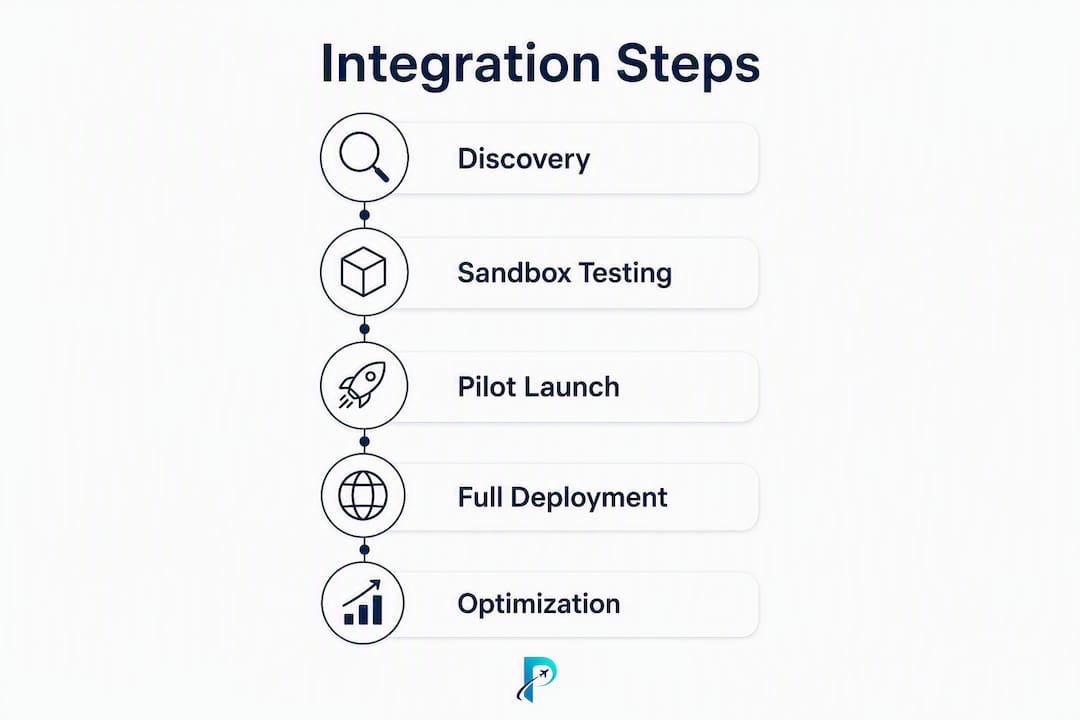
- Discovery (1–2 weeks). Map your PMS/booking engine, identify data fields needed (reservation ID, room type, guest profile, check-in/out dates), and agree on the integration pattern. The vendor's solutions engineer leads this; your hotel IT or PMS vendor provides API credentials and documentation.
- Sandbox/API onboarding (2–4 weeks). Connect to the vendor's sandbox environment, run test reservations, and validate data mapping. Acceptance criteria: reservation binding works, room-type codes match, and guest profile data populates correctly.
- Pilot — single property (2–4 weeks). Go live with one property and a limited guest cohort. Monitor sync latency, test the pre-arrival link flow, and confirm upsell booking works end-to-end. Collect staff feedback.
- Rollout and ongoing support (ongoing). Expand to additional properties, configure white-label branding per property, and establish SLA monitoring. Most vendors offer a dedicated solutions engineer for the first 90 days.
| Phase | Typical Timeline | Cost Shape |
|---|---|---|
| Discovery | 1–2 weeks | Included in onboarding or flat setup fee |
| Sandbox/API onboarding | 2–4 weeks | Included in SaaS plan or per-integration fee |
| Pilot (single property) | 2–4 weeks | SaaS subscription + optional white-label fee |
| Rollout and support | Ongoing | Monthly/annual SaaS subscription + per-trip credits if applicable |
Cost models to compare:
- SaaS subscription + per-trip credits. The most common model for travel agencies. A monthly or annual base fee covers the platform; individual trip generations or itinerary exports may draw from a credit pool.
- Integration implementation fees. Some vendors charge a one-time fee for PMS connector setup, especially for less common PMS platforms. Ask whether this is included in the base plan or billed separately.
- White-labeling and customization. Custom branding (logo, domain, color palette) may be included in agency tiers or priced as an add-on. Clarify this before signing.
Travel itinerary workflow automation resources can help your team plan the operational change management that runs alongside the technical rollout.
What should you ask every vendor before you sign?
Use this checklist in vendor demos and RFPs. It covers technical, commercial, and support dimensions, plus the red flags that signal a platform isn't ready for boutique-hotel integration.
Technical must-haves
- Which PMS platforms does the vendor natively support? Ask for a current list, not a roadmap.
- Does the platform support webhooks for real-time reservation events?
- Is there a sandbox environment available before purchase?
- Where is the API documentation published, and is it publicly accessible?
- What data export formats are supported (JSON, CSV, iCal)?
- What is the uptime SLA, and is it contractually guaranteed?
- If payments pass through the itinerary (upsell bookings), is the platform PCI DSS compliant?
Commercial items
- Is pricing per seat, per property, per trip, or a flat subscription?
- Are white-labeling and custom branding included, or priced separately?
- Is a free trial or sandbox demo available without a sales call?
- What is the refund or cancellation policy?
Operational and support questions
- What does the onboarding timeline look like, and is a dedicated solutions engineer included?
- What is the escalation SLA for critical integration failures?
- Are training resources (documentation, video walkthroughs, live sessions) included?
Red flags to watch for
- No sandbox or demo environment available before purchase.
- API documentation is private, incomplete, or described only as "coming soon."
- Unclear data ownership clauses in the contract (you should own your guest data).
- Vague or unwritten SLA commitments.
- No stated PCI compliance posture when the platform handles payment flows.
Some platforms position themselves as full CRM-enabled tools but limit API openness and plan integrations for a future release. That's a meaningful procurement risk if your timeline is short.
Pro Tip: Ask for a staged pilot contract that covers a single property for 60–90 days before committing to an enterprise rollout. It limits financial risk and gives you real performance data to justify the broader investment.
Best practices and a real-world example for boutique hotels
The most reliable implementation pattern follows a staged approach: start simple, validate with real guests, then add complexity.
Best-practice checklist:
- Start with a pre-arrival link, not a full PMS integration. Get the guest experience right first.
- Capture guest preferences (dietary needs, activity interests, accessibility requirements) at the pre-arrival stage so the itinerary is personalized before check-in.
- Map upsell offers to specific room types. A garden-view room gets a different set of experience recommendations than a suite.
- Use PWA/offline mode so guests can access their itinerary without cell service, particularly relevant for coastal or rural boutique properties.
- Keep a human-in-the-loop for final itinerary verification. Operations playbooks recommend automated baselines plus human verification when serving high-touch clients, and boutique guests are exactly that audience.
A short case-style example: A small coastal boutique inn with 18 rooms wanted to reduce front-desk call volume and increase spa bookings. They started with a pre-arrival link sent 10 days before check-in, pointing guests to a branded itinerary with curated local restaurant recommendations and a spa booking widget. After validating the guest flow, they added an iCal import from their booking engine to auto-populate reservation dates. In the third phase, they connected their PMS via API to enable real-time check-in status and room-type-specific upsell offers. The result: front-desk staff reported fewer "what's included" calls, and the spa saw a measurable increase in pre-arrival bookings.
Key insight: The most effective boutique-hotel itinerary integrations don't try to automate everything at once. They start with the guest-facing experience, prove the value, and then layer in the technical depth. That sequence keeps staff confident and guests happy throughout the rollout.
Pro Tip: Always design a manual override workflow for concierge staff. If the PMS sync temporarily fails, staff need a clear fallback: a simple form or dashboard view that lets them update the guest itinerary manually without waiting for the technical issue to resolve.
Common integration pitfalls and how to avoid them
Even well-planned integrations hit friction. These are the problems that come up most often, and the fixes that actually work.
Frequent pitfalls:
- Inconsistent reservation IDs. Your PMS and the itinerary platform may use different ID formats for the same booking. Establish a canonical ID mapping document during discovery and test it with at least 20 real reservation records before go-live.
- Double-booking risk from delayed sync. If availability updates lag by more than a few minutes, a guest could book an upsell for a time slot that's already taken. Idempotent webhooks and retry logic on the itinerary platform side reduce this risk significantly.
- Mismatched room-type codes. PMS room-type codes rarely match the display names guests see. Build a translation table during sandbox testing and keep it version-controlled.
- Missing sandbox testing. Skipping the sandbox phase to save time is the single most common cause of go-live failures. Every integration pattern needs at least two weeks of sandbox validation.
- Poor guest UX when data lags. If the itinerary shows stale information (wrong check-in time, outdated room assignment), guests lose trust fast. Add a "last updated" timestamp to the guest view and set up monitoring alerts for sync failures.
Operational fixes:
- Build a reconciliation workflow: a daily or twice-daily check that compares PMS reservations against itinerary records and flags discrepancies.
- Maintain a clear data-mapping document that both the vendor's solutions engineer and your hotel IT team can reference.
- Define acceptance criteria before go-live: reservation binding works within X minutes, update propagation completes within Y minutes, and guest flow continuity is confirmed end-to-end.
- Document a rollback plan. If the integration fails post-launch, you need a clear path back to manual workflows without disrupting active guest itineraries.
When to escalate: Contact vendor support when the issue is in the platform's API or webhook infrastructure. Contact your PMS vendor when the issue is in the data coming out of the PMS. Contact your hotel IT team when the issue is in network configuration or authentication. Knowing which party owns the problem saves hours of misdirected troubleshooting.
Key Takeaways
The right itinerary app for boutique hotel integration combines white-label guest itineraries, PMS/booking-engine sync, pre-arrival preference capture, and an agency dashboard, giving travel pros a single platform to deliver branded, upsell-ready experiences without extra manual work.
| Point | Details |
|---|---|
| Start staged, not full | Begin with a pre-arrival link or iCal import before committing to a full PMS/API integration. |
| PMS/API is the richest option | Native PMS integration delivers real-time reservation binding and guest profile data, but requires sandbox testing and data mapping. |
| Vendor checklist matters | Always confirm sandbox access, API documentation, uptime SLA, and PCI posture before signing any contract. |
| Pilot before enterprise rollout | A 60–90 day single-property pilot limits risk and generates real performance data to justify broader investment. |
| Planytera covers the checklist | Planytera offers white-label itineraries, PMS sync, pre-arrival links, offline PWA, and an agency dashboard with sandbox/demo access. |
Why this approach works for boutique hotels and travel pros
The pattern I keep seeing in successful boutique-hotel integrations is deceptively simple: the properties that get the best results don't start with the most technically ambitious setup. They start with the guest experience and work backward to the systems.
A pre-arrival link that takes a guest 90 seconds to interact with does more for ancillary revenue than a perfectly architected PMS integration that no one on the front desk knows how to use. The technology has to serve the human workflow, not the other way around.
What I'd push back on is the assumption that boutique hotels need a lighter or simpler solution than larger properties. They often need a more precise one. A 20-room inn has less margin for error than a 200-room chain hotel. Every guest interaction is visible. A broken itinerary link or a stale room assignment gets noticed immediately. That's why the evaluation checklist in this guide leans hard on sandbox access, SLA commitments, and manual override workflows. Those aren't enterprise concerns. They're boutique-hotel survival requirements.
Planytera's approach, combining AI-powered personalization with offline access, agency branding tools, and a clear onboarding path, fits this pattern well. The platform is built for the kind of high-touch, personalized experience that boutique properties and their travel-pro partners need to deliver. If you want to see how the pre-arrival and agency features work in practice, request a demo or explore the sandbox before committing to a plan.
Planytera makes boutique hotel itinerary integration practical
Boutique hotel teams and travel pros spend too much time stitching together booking confirmations, guest emails, and PDF itineraries. Planytera replaces that manual assembly with AI-powered, branded day-by-day plans that are ready in minutes, not hours.
Here's how Planytera maps directly to the checklist in this guide:
- White-label itineraries with your hotel's branding, logo, and contact details on every guest-facing plan
- PMS sync and pre-arrival links that capture guest preferences before check-in and surface upsell offers in context
- Offline PWA access so guests stay connected to their itinerary regardless of signal strength
- Agency dashboard for multi-property management, group rooming lists, and team collaboration
- Sandbox and demo access so you can validate the guest flow before signing a subscription
Onboarding follows the staged approach outlined in this guide: discovery, sandbox validation, single-property pilot, then rollout. Support is included throughout. View Planytera's subscription plans or go straight to the main product page to request a demo and see the agency and hotel features in action.
Useful sources for planning your integration
These resources support the technical and operational planning work covered in this guide.
- Planytera: AI Trip Planner for Personalized Itineraries — Main product page with demo access, agency features, and subscription plan details. Start here if you want to see the white-label and PMS sync capabilities firsthand.
- AI Itinerary Customization Guide for Smarter Travel — Planytera's operational guide to AI-driven personalization, useful for understanding how preference data shapes day-by-day plans.
- How to Set Up a Shared Itinerary for Group Trips — Practical setup guide for collaborative itineraries and group rooming lists; directly relevant to DMC and agency workflows.
- Travel Itinerary Workflow Software That Works | TravelEngine — Partner resource covering workflow automation and booking management templates for travel teams managing operational change.
- Booking Management Software for Travel Agencies | TravelEngine — Partner feature page describing booking reconciliation and agency-hotel coordination workflows that align with the integration patterns in this guide.
- How to Build a Travel Planner App: A Complete Guide for 2026 — Technical reference for teams evaluating build-vs-configure decisions and API architecture for travel planning apps.
- Itinerary Management Apps | Moonstride — Industry overview of how itinerary management apps connect with PMS providers and booking platforms via API or XML.
- Top 10 Common Inefficiencies in Traditional Trip Planning — Planytera's breakdown of the operational pain points that integrated itineraries resolve, useful context for building an internal business case.