
Delegate tasks for group trip planning by assigning three named leads before anything else: a Budget Lead, a Logistics Lead, and an Anchor Curator. The Lead System reframes group planning as operations, not committee work. Each role owns a clear slice of the trip, which cuts decision fatigue and prevents money fights before they start. Your planning SLA: Anchor Curator locks the headline activity well in advance; Logistics Lead confirms transport and accommodation shortly before departure; Budget Lead runs expense settlements during and at the end of the trip. Paste this into your group chat to lock roles now:
- Budget Lead (name): owns shared expense tracking, settlement dates, and payment disputes
- Logistics Lead (name): owns transport, accommodation, check-in times, and printed docs
- Anchor Curator (name): owns the one headline activity per day and the free-time schedule
- Opt-in rule: every activity beyond the daily Anchor is optional — no guilt, no pressure
- SLA dates: Anchor confirmed by [date 30 days out] | Logistics confirmed by [date 14 days out] | Midpoint settlement on [date] | Final settlement on last day
Table of Contents
- How do you appoint a trip organizer and assign roles?
- How do you set up a shared expense system for a group trip?
- Who brings what? Delegating packing and shared supplies
- What communication rules keep a group trip running smoothly?
- Copyable task-assignment checklist and timeline
- How do you resolve conflicts or overlapping responsibilities?
- What happens when a group member drops out or changes availability?
- How do you set deadlines and reminders that people actually follow?
- Key Takeaways
- The failure patterns delegation actually prevents
- Your group trip, planned in minutes with Planytera
- Useful sources and further reading
How do you appoint a trip organizer and assign roles?
A named lead for each domain cuts friction fast. CNN's group travel guidance recommends appointing a leader and delegating bookings as the first step to avoiding conflict. The right person for each role is whoever already does that job naturally in the group: the spreadsheet person becomes Budget Lead; the one who researches flights becomes Logistics Lead; the person who always finds the coolest local spot becomes Anchor Curator.
| Role | Primary Responsibilities | Deliverables | Deadline |
|---|---|---|---|
| Budget Lead | Track shared expenses, run settlements, resolve disputes | Expense log link, settlement summary | Midpoint + final day |
| Logistics Lead | Book transport and accommodation, manage check-in docs | Confirmed bookings, printed itinerary | 14 days before departure |
| Anchor Curator | Choose one headline activity per day, schedule free time | Daily anchor list, opt-in activity menu | 30 days before departure |
Message templates for your group chat:
- "Hey [name], your our Budget Lead. Please set up [Splitwise / Venmo / your preferred app] and share the link by [date]."
- "[Name], your Logistics Lead. Can you confirm our accommodation and transport bookings by [14-day date]?"
- "[Name], your Anchor Curator. Pick one must-do activity per day and share the list by [30-day date]. Everything else is opt-in."
How do you set up a shared expense system for a group trip?
Money is the fastest way to damage friendships on a trip. A clear rule set prevents lingering reimbursements and social friction.
Shared vs. optional expense categories:
- Shared (split equally): accommodation, group transport (rental car, charter bus), shared groceries, group entry fees
- Optional (pay your own): individual meals out, personal souvenirs, solo activities, room upgrades
For the expense tool, Splitwise is the most widely used option for US-based groups because it handles unequal splits, multiple currencies, and sends automatic reminders. Venmo works well for simple equal splits among friends who already use it. Quick setup checklist:
- Invite every group member before the first expense is logged
- Set your default currency and payment methods on day one
- Agree on one logging rule: receipts go in within 24 hours of the expense
Settlement cadence: Budget Lead runs the first settlement at the trip's midpoint so no one carries a large balance for weeks. The final settlement happens on the last day. For late payments, a firm but friendly 72-hour reminder message works better than public pressure.
Pro Tip: For international groups where members pay in different currencies, review transfer fees before the trip. SoFi's international money transfer guide breaks down provider fees and timing so you can choose the lowest-cost option for your group's specific countries. Wise and PayPal both support multi-currency settlement, but fees vary by corridor.
Who brings what? Delegating packing and shared supplies
Duplicate purchases and last-minute pharmacy runs are avoidable. Assign shared-item ownership in the same doc where you track the itinerary, so everyone can see what's covered.

| Shared Item | Logical Owner | Notes |
|---|---|---|
| First-aid kit | Logistics Lead | Restock after each use |
| Portable charger / power strip | Anchor Curator | Confirm voltage for destination |
| Printed tickets and docs | Logistics Lead | One physical copy + digital backup |
| Shared groceries (snacks, breakfast items) | Budget Lead | Budget pre-agreed; receipt logged |
| Sunscreen / bug spray (communal) | Rotating — assigned at kickoff | Whoever has the most space in their bag |
Shared item loads scale with trip length and group size; for shorter trips, assign a few shared items per person, while longer trips may require additional shared supplies and restock planning. Keep the master packing list in a shared Google Doc or in your planning app so anyone can check off items as they're packed.
What communication rules keep a group trip running smoothly?
Message chaos is a real trip-killer. One primary channel and three simple decision rules fix most of it.
| Situation | Rule | Who Decides |
|---|---|---|
| Low-cost choice (under budget) | Two-hour rule: if no objection in 2 hours, it's confirmed | Anyone can propose |
| Non-critical group choice | Majority vote in the group chat | Budget or Logistics Lead calls the vote |
| Time-sensitive issue (missed transport, weather change) | Lead decides immediately, informs group after | Logistics Lead |
| Emergency (medical, lost member) | Call 911 first; meet at pre-agreed landmark; Logistics Lead holds printed tickets | Logistics Lead |
Use one app for all planning messages (WhatsApp or iMessage work for most US groups). Keep a separate, quieter channel or text thread for emergency contacts only, so urgent messages don't get buried in activity chatter. Before departure, Logistics Lead shares a printed card with: local emergency number, nearest hospital address, group meeting point, and who holds the physical tickets.
Copyable task-assignment checklist and timeline
Paste this checklist into your shared doc or planning app on day one.
Copy-paste task checklist:
- Budget Lead assigned and expense app set up
- Logistics Lead assigned and booking checklist started
- Anchor Curator assigned and first anchor activity confirmed
- Shared packing list created and items assigned
- Communication channel agreed and emergency card drafted
- Social contract posted in group chat
- Midpoint and final settlement dates set
Shareable trip-planning templates that combine itinerary, costs, and task assignments in one place reduce chat volume and make every responsibility visible to the whole group.
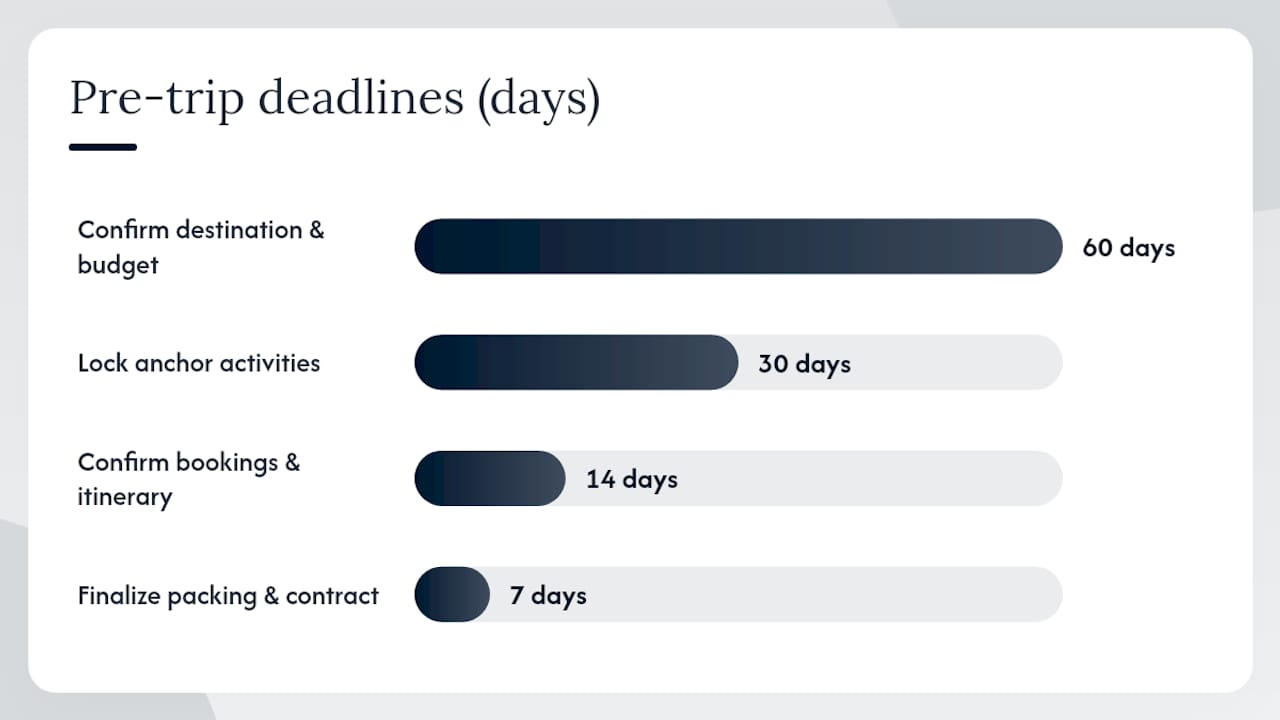
| Phase | Checkpoint | Owner | Deadline |
|---|---|---|---|
| Pre-trip (60 days) | Confirm destination, rough budget, and group size | Budget Lead | 60 days out |
| Pre-trip (30 days) | Lock Anchor Activities and opt-in menu | Anchor Curator | 30 days out |
| Pre-trip (14 days) | Confirm all bookings, share printed itinerary | Logistics Lead | 14 days out |
| Pre-trip (7 days) | Finalize packing assignments, post social contract | All leads | 7 days out |
| On-trip (daily) | Morning check-in, confirm anchor and meeting point | Rotating daily lead | Each morning |
| On-trip (midpoint) | Run expense settlement | Budget Lead | Trip midpoint |
| Wrap-up | Final settlement, shared photo album, group debrief | All leads | Within 48 hrs of return |
For a weekend trip (2–3 days), compress the 60-day and 30-day checkpoints into a single 14-day prep session. The on-trip and wrap-up phases stay the same regardless of trip length.
How do you resolve conflicts or overlapping responsibilities?
Overlapping ownership is the most common friction point in group planning. Two people both book a restaurant for the same night, or the Budget Lead and Logistics Lead disagree on how much to spend on accommodation. The fix is a written decision log, not a group debate.
When a conflict surfaces, the relevant lead owns the resolution. If it crosses two roles (say, a budget dispute about an activity the Anchor Curator booked), the two leads talk privately first and bring a single recommendation to the group. No open-ended group votes on contested items: they take too long and create resentment. If the two leads can't agree within 24 hours, the trip organizer (whoever initiated the trip) makes the call.
For overlapping task assignments, the rule is simple: whoever is listed first in the checklist owns it. If the checklist is ambiguous, the Logistics Lead updates it immediately and notifies the group. Keeping the task list current is more useful than any post-conflict debrief.
What happens when a group member drops out or changes availability?
Someone always drops out. Plan for it. When a member exits before the trip, the Budget Lead recalculates shared costs immediately and updates the expense log. Accommodation and transport bookings may need to be amended; Logistics Lead owns that within 48 hours of the dropout notification.
If a member's role was critical (they were the only driver, or they held a booking in their name), Logistics Lead reassigns that specific task first, before anything else. The AI Group Travel Coordinator approach of automated preference collection and reminders is useful here: when someone new joins late, a quick preference form gets them up to speed without a long onboarding call.
On-trip availability changes (someone gets sick, someone wants to skip a day) follow the opt-in rule: no one is obligated to attend non-Anchor activities. For Anchor Activities, the Anchor Curator adjusts the booking if possible and notes the change in the shared itinerary. The group moves on without drama.
How do you set deadlines and reminders that people actually follow?
Deadlines without reminders are wishes. Set every SLA date in the shared doc and pair each one with a calendar reminder sent to the responsible lead, not the whole group. Sending reminders to everyone creates noise; sending them to the owner creates accountability.
For the three-role system, a simple reminder schedule works well:
- 30 days out: automated reminder to Anchor Curator to confirm the headline activity
- 14 days out: reminder to Logistics Lead to share confirmed bookings
- 7 days out: reminder to all leads to review the checklist and flag anything incomplete
- 48 hours before departure: Logistics Lead sends the final itinerary to the group
Use your phone's native calendar, Google Calendar, or a task app like Todoist to set these. The key is that each reminder goes to the named lead, with the specific deliverable in the reminder text, not a vague "check on the trip." Specific reminders get done. Vague ones get snoozed.
Key Takeaways
Effective group travel task delegation comes down to three named leads, a short SLA, and a shared doc everyone can see and edit from day one.
| Point | Details |
|---|---|
| Assign three leads first | Budget Lead, Logistics Lead, and Anchor Curator each own a clear domain before any booking happens. |
| Use a planning SLA | Anchor confirmed 30 days out; logistics confirmed 14 days out; settlements at midpoint and final day. |
| Shared doc beats group chat | A single checklist or template visible to all leads cuts follow-up messages and surfaces gaps fast. |
| Opt-in rule protects relationships | Only the daily Anchor Activity is required; everything else is optional, stated explicitly in the social contract. |
| Planytera speeds the whole system | Planytera generates cost estimates, a shareable itinerary, and AI-curated activity options so each lead starts with real data, not guesswork. |
The failure patterns delegation actually prevents
The trips that go sideways usually share one of three problems: a money fight that started because no one tracked expenses in real time, a missed meetup because the meeting point was never written down, or one person who did everything and arrived home exhausted and resentful.
The three-lead model addresses each one directly. The Budget Lead's expense log makes money visible before it becomes a grievance. The Logistics Lead's printed itinerary, which should include meeting points, transport legs, and scheduled activities, means no one is guessing where to go. And distributing ownership across three roles means no single person carries the whole trip.
What leaders often miss mid-trip is the drift: the Anchor Curator stops posting the daily check-in, the Budget Lead skips logging a few receipts, and by day four the system has quietly collapsed. The fix is a 60-second morning check-in, not a full debrief. Keep the template short, keep it daily, and the structure holds.
Your group trip, planned in minutes with Planytera
Coordinating three leads, a shared expense log, and a day-by-day itinerary is a lot to build from scratch. Planytera does the heavy lifting: enter your destination, group size, and preferences, and get a personalized, editable itinerary ready to share with your leads in minutes.

Budget Lead gets cost estimates per activity. Logistics Lead gets a shareable, offline-accessible plan with transport and check-in details. Anchor Curator gets AI-curated activity options ranked by the group's interests and pace. Every lead starts with real data instead of a blank page. Check out Planytera's subscription plans and get your group's itinerary built today at planytera.com.
Useful sources and further reading
| Source | Why it's useful |
|---|---|
| The Lead System: How to Plan a Group Trip Without the Drama — Go Beyond Travel | Defines the three-lead role model and SLA timings used throughout this article. |
| Group Trip Planner Template — Taskade | Ready-to-use template combining itinerary, cost tracking, and task assignments in one shareable doc. |
| AI Group Travel Coordinator Agent — Taskade | Automates preference collection and reminders so leaders spend less time chasing responses. |
| Group Friend Vacation Planning Tips — CNN | Practical high-level advice on appointing a leader and delegating bookings to avoid conflict. |
| Traveling with a Group: How to Plan and Stay Friends — The New York Times | Covers travel style discussions and delegation strategies that protect relationships. |
| Itinerary — Wikipedia | Clear definition of itinerary components: meeting points, transport legs, and scheduled activities. |
| International Money Transfer — SoFi | Explains transfer fees and provider options for groups settling expenses across currencies. |
| How to Set Up a Shared Itinerary for Group Trips — Planytera Blog | Step-by-step guide to building and sharing a group itinerary using Planytera's collaborative features. |