
A shared travel journal is a single collaborative record, digital or physical, where multiple people add notes, photos, and memories during planning, travel, and after the trip. Understanding how shared travel journals work comes down to three core components: access and invites (getting everyone into the same space), contribution method (how each person adds content), and preservation and export (how the record survives the trip). Picture this: your friend snaps a photo at a night market in Bangkok, adds a one-line caption, and uploads it to your group's shared journal before dessert arrives. Everyone sees it instantly.
Three things make a shared journal actually function:
- Invite and access: One person creates the journal and sends contributors a link, token, or email invite.
- Contribution method: Each contributor adds entries, photos, audio, or captions, either in real time or during a daily upload window.
- Preservation and export: After the trip, the group downloads, backs up, or prints the full record before the platform or notebook gets lost.
Table of Contents
- How shared travel journals work, step by step
- Physical vs. digital: which format fits your group?
- Templates and prompts that actually get people contributing
- Contributor roles, permissions, and etiquette your group needs to agree on
- Keeping everyone engaged and managing physical handoffs
- How to export, back up, and turn your journal into a keepsake
- How Planytera supports your shared travel journal
- Planning and journaling together, without the extra apps
- Sources
How shared travel journals work, step by step
Getting a shared journal off the ground before departure is the move that separates groups who actually finish one from groups who share a Google Photos album and call it a day. Follow this checklist.
Pre-trip (1–2 weeks before departure):
- Decide the purpose. Planning only? Memories only? Both? A clear scope stops contributors from second-guessing what belongs.
- Choose your format. Physical notebook, digital app, or a hybrid. Assign one person as the owner or admin who manages invites.
- Create and name the journal. Add trip name, dates, and a short description so every entry lands in context.
- Invite contributors and agree on rules. Who can edit? Who can only view? What media is allowed? Set a post-trip upload deadline.
- Set rituals. Pick a daily upload window (dinner time works well) and agree on a short post-trip deadline for final entries.
During the trip:
- One person sends a daily micro-prompt at a set time (more on prompts in the next section).
- Contributors upload within the agreed window, even if it's just one photo and a sentence.
Within 48–72 hours after return:
- Everyone does a final bulk upload of any remaining photos or notes.
- The owner exports or backs up the full journal before momentum fades.
Pro Tip: Assign a "reminder person" before you leave. Their only job is to send the daily prompt message to help maintain consistent contributions.
Physical vs. digital: which format fits your group?
The format choice shapes everything from who can contribute to how the journal survives the trip. Both physical and digital options have real strengths, and the right pick depends on your group's size, tech comfort, and what you want to do with the journal afterward.
Physical shared journals work best for small groups (2–4 people) who want a tactile, creative record. The Midori Traveler's Notebook system is a strong example: its modular insert design lets contributors swap in lined, dot-grid, blank, or watercolor paper depending on what they want to create. The tradeoff is logistics. Someone carries the notebook, and sharing it across a group requires a rotation schedule or mailing it between contributors.
Digital shared journals remove the logistics problem entirely. Contributors add entries from their own phones, offline uploads sync later, and the whole group sees a merged timeline. The feature set varies by tool, but the dimensions that matter most for groups are:
| Dimension | Physical (e.g., Midori Traveler's Notebook) | Digital apps |
|---|---|---|
| Best for | Small groups, creative/tactile workflows | Any group size, remote contributors |
| Contributor limits | No hard limit, but logistics scale poorly | Varies by tool (e.g., Day One sets a contributor limit to keep shared journals manageable) |
| Media support | Printed photos, tickets, stickers, watercolor | Photos, audio, video, attachments |
| Offline access | Always available | Depends on app; best tools sync offline |
| Export options | Scan, photograph, or bind pages | PDF, ZIP, CSV metadata export |
| Cost | Notebook + inserts | Free tiers to paid subscriptions |
For groups that want planning and journaling in one place, an integrated digital workflow is the practical choice. Planytera pairs AI-generated day-by-day itineraries with a built-in trip journal, so entries attach directly to itinerary days rather than floating in a separate app.
Templates and prompts that actually get people contributing
The biggest participation killer is a blank page. Ready-made templates and short prompts lower the barrier enough that even the least journaling-inclined traveler in your group will add something.
Copy-ready page templates:
- Daily recap: "Date / Location / Weather / Best moment / One thing I'd do differently"
- Highlight of the day: "In one sentence, today was ___."
- Expense log: "What we spent / Who paid / Split or not"
- Photo caption template: "Where: / Who: / What was happening: / How it felt:"
- Packing list page: Columns for Item, Packed by, and Needed again?
Contributor prompts (use as daily upload rituals):
- 3-photo prompt: Upload exactly three photos: one place, one person, one food or object.
- 1-sentence highlight: The single best moment of the day, in one sentence.
- Funniest moment: What made the group laugh today?
- What surprised me: One thing you didn't expect.
Calm's travel journaling guide recommends keeping entries low-pressure and sensory-focused, like a single-moment snapshot rather than a full diary entry. That approach works especially well in a group setting where contributors have different writing comfort levels.
Physical journal spread ideas:
- Title page: Trip name, dates, contributor names, and a group photo slot.
- Itinerary page: Day-by-day plan with space for handwritten notes alongside each item.
- Collage page: Ticket stubs, receipts, washi tape, and printed photos layered together.
For digital entries, a simple layout works best: date and location at the top, one featured photo, a two-to-three sentence recap, and a contributor tag so everyone knows who wrote what.
Contributor roles, permissions, and etiquette your group needs to agree on
Permission models prevent the two most common shared journal problems: accidental overwrites and privacy conflicts. Most digital tools use a three-tier model.
Common permission tiers:
- Owner/admin: Creates the journal, manages invites, can remove members, and controls export settings. Journey Cloud Sync's model is a clear example: only the owner can remove members, which keeps admin control clean.
- Editor: Can add entries, upload media, and edit their own content.
- Viewer: Can read and browse but cannot add or change anything. Useful for family members following along from home.
Etiquette checklist to agree on before the trip:
- Photo consent: Confirm that everyone in a photo is comfortable having it in the shared journal before uploading.
- Caption ownership: The person who took the photo writes the first caption. Others can add comments, not rewrites.
- Sensitive content: Agree on what stays private (medical moments, arguments, personal conversations).
- Member removal: If someone leaves the trip or the group, the owner handles removal and decides whether their entries stay.
- Version clarity: Original entries don't get deleted. If a caption needs updating, add a note rather than overwriting.
A simple consent line to paste into your invite message: "By joining this shared journal, you agree that your entries and photos may be seen by all contributors listed in the invite."
Pro Tip: For physical journals, agree upfront on who can add to another person's spread. A light pencil note asking "Can I add a photo here?" goes a long way toward keeping the creative peace.
Keeping everyone engaged and managing physical handoffs
Participation drops fast without structure. The groups that finish a shared journal are usually the ones who assigned roles before departure, not the ones who hoped everyone would pitch in naturally.
Suggested roles:
- Trip captain: Owns the journal (digital or physical), manages invites, and sends the daily prompt.
- Scribe: Writes the day's recap entry. Rotate this role daily so no one burns out.
- Photographer: Responsible for the day's featured photos. Also rotates well.
- Uploader: Collects photos from the group's camera roll and does the daily bulk upload if contributors aren't uploading themselves.
Engagement tactics that work:
- Send a micro-prompt at a fixed time each day (dinner is the most reliable window).
- Keep the upload window short and specific: "Add your entry before 10 PM."
- Celebrate contributions publicly in the group chat. A simple "great caption" message increases the next day's participation.
Physical journal logistics:
- Set a rotation schedule before departure so everyone knows when they hold the notebook.
- If contributors are in different cities or countries, ship the journal with tracking and basic padding. Photograph every spread before mailing in case it's lost.
- For high-value or heavily decorated journals, consider a declared value shipping option for added protection.
- If someone drops out of the trip, the owner decides whether their pages stay or get folded into a keepsake insert.
TravelMagma's travel journal ideas highlight nightly highlight-sharing as one of the most effective group rituals, noting the emotional payoff of building a collective memory spine together. A five-minute end-of-day recap at dinner, where each person shares one highlight before uploading, turns the journal from a chore into a ritual everyone looks forward to.
How to export, back up, and turn your journal into a keepsake
The journal only matters if it survives. Export and backup should happen soon after returning home, while everyone still has their photos organized and the trip is fresh.
Export checklist:
- Download all photos from the shared journal in full resolution.
- Export entries as PDF or a ZIP file containing images and a CSV of metadata (dates, locations, contributor names).
- Ask every contributor to do a final bulk upload of any photos still sitting in their camera roll.
- Save a redundant copy to both cloud storage (Google Drive, iCloud, Dropbox) and a local hard drive.
Keepsake options:
- Photo books: Services like Artifact Uprising or Chatbooks let you upload a PDF or photo set and print a bound book.
- Scanned physical journals: Scan every spread at high resolution (300 DPI minimum) before the notebook degrades.
- Bound prints: Print individual pages and bind them at a local print shop for a custom feel.
- Archival storage for physical journals: Store in an acid-free box away from direct light to prevent fading.
One privacy reminder: before sharing the exported journal with anyone outside the original contributor group (family, social media, a blog), confirm that every person pictured or mentioned has consented to that wider audience. A view-only link shared with family is a good middle ground, letting relatives follow along without giving them edit access.
How Planytera supports your shared travel journal
Planytera is built for exactly the workflow this article describes: plan the trip, invite your group, journal as you go, and export everything cleanly at the end. Here's what that looks like in practice.
Features that matter for group journaling:
- Shared trip access: Invite collaborators directly into your trip. Everyone sees the same itinerary and journal in one place.
- Journal entries attached to itinerary days: Each day's entry links to that day's plan, so context never gets lost. No more "wait, which day was the waterfall?"
- Offline access: Contributors can add entries and photos without a connection. Everything syncs when they're back online.
- Export and print options: Download your full trip journal after the trip, ready to send to a photo book service or archive locally.
- Permission controls: Owner, editor, and viewer roles keep the right people in the right seats.
Recommended workflow:
- Create your trip in Planytera and add your day-by-day itinerary.
- Invite collaborators using the shared access feature. Assign roles (owner, editor, viewer).
- Attach a daily journal prompt to each itinerary item so contributors know exactly what to capture.
- After the trip, bulk-export entries and photos for your keepsake or backup.
Pairing itinerary and journal in one app cuts the biggest friction point in group travel documentation: context loss. When an entry lives next to the itinerary item it describes, you never have to guess where a photo was taken or what day something happened. For groups managing mixed preferences and travel styles, that single source of truth is worth a lot.
Pro Tip: Before your trip, set up a Planytera journal prompt for each day's biggest planned activity. Contributors see the prompt when they open the app and know exactly what to document, even if they're not natural writers.
Why shared journals are worth the small effort
The real value of a shared travel journal isn't the archive. It's the ritual. When a group agrees to spend five minutes at dinner sharing one highlight and uploading one photo, the trip itself becomes more intentional. People notice more. They look for the moment worth capturing instead of scrolling through their phones.
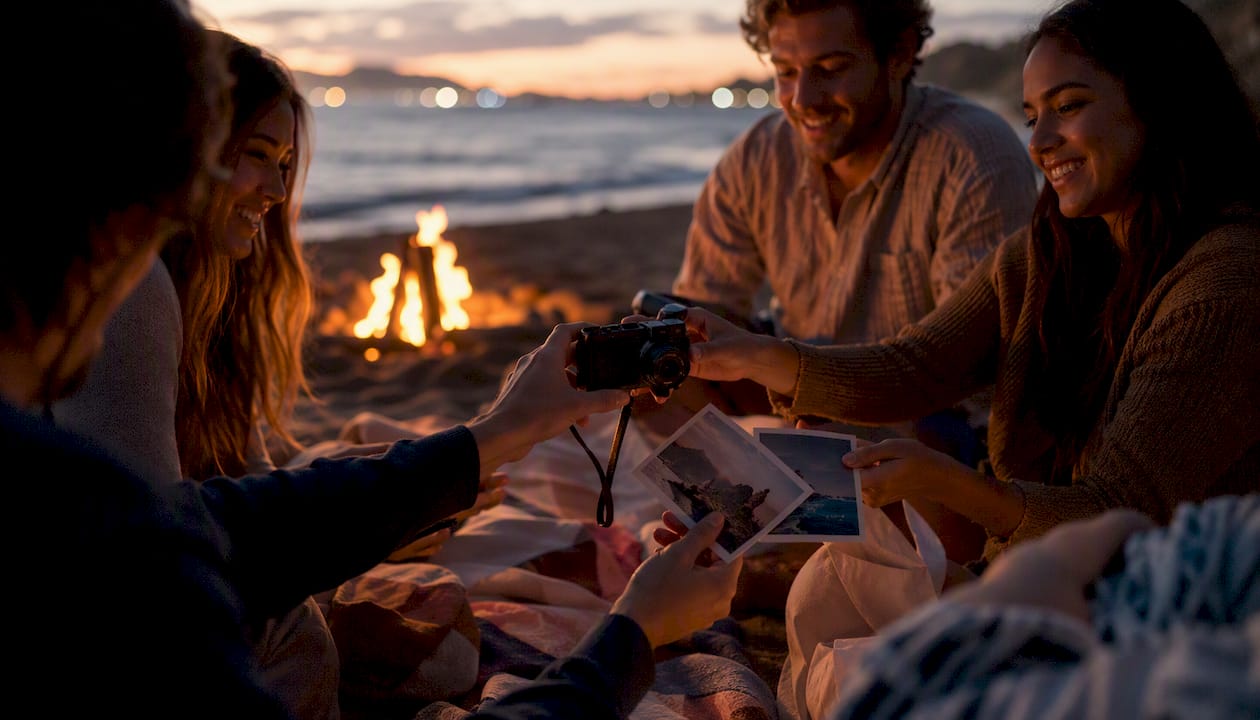
Multiple perspectives are what make a shared journal genuinely different from a solo one. Your travel companion noticed the smell of the spice market; you noticed the vendor's handmade sign. Both details belong in the record, and neither of you would have written the other's observation. That layered view is what makes rereading a shared journal feel like reliving the trip rather than just reviewing your own memory of it.
The ritual I'd recommend to any group: the three-photo prompt at dinner. Each person uploads exactly three photos before the check arrives. It takes two minutes, it's low-pressure, and it builds a habit fast. Groups that start with this ritual tend to keep contributing long after the trip ends.
Planning and journaling together, without the extra apps
Planytera gives your group a single place to plan the trip and document it as it happens. Your AI-generated itinerary is ready in moments, your collaborators join with one invite, and your journal entries attach to each day automatically.

Here's what you get with Planytera:
- Personalized day-by-day itineraries built around your group's pace, budget, and preferences.
- Shared journal access so every contributor adds memories to the same record, not a scattered group chat.
- Offline access for entries and photos even when the Wi-Fi disappears.
- Clean export after the trip, ready for a photo book or your personal archive.
Ready to plan your next group trip and document it properly? Create your first shared trip on Planytera and invite your group today.
Key Takeaways
A shared travel journal works best when your group agrees on roles, rituals, and export plans before departure, not after.
| Point | Details |
|---|---|
| Set up before you leave | Create the journal, invite contributors, and agree on rules and a daily upload ritual pre-trip. |
| Assign clear roles | A trip captain, scribe, and uploader keep contributions consistent without relying on everyone to self-organize. |
| Use low-pressure prompts | Short prompts like the three-photo ritual or a one-sentence highlight reduce friction and increase participation. |
| Export within 48–72 hours | Download all photos and entries, save redundant cloud and local copies, and confirm photo consent before wider sharing. |
| Planytera integrates both | Planytera pairs AI itinerary planning with a shared trip journal, so entries attach to itinerary days and export cleanly after the trip. |
Sources
The following sources informed specific sections of this article: