
The most effective way to coordinate group travel when preferences conflict is a two-phase, AI-assisted workflow: first, collect and weight every traveler's preferences, then generate curated options and vote to finalize. This approach turns subjective disagreements into quantifiable trade-offs, so nobody feels steamrolled and deadlocks get resolved fast.
Before you pick any tool, check that it covers these four essentials:
- Preference capture: multi-user forms that collect diet, pace, budget, accessibility needs, and visa constraints
- Weighting controls: the ability to prioritize hard limits (mobility needs, strict budgets) over soft preferences
- Voting mechanism: a built-in way for the group to rank or approve options without a separate poll app
- Privacy controls: consent settings and anonymized notes for sensitive health or travel data
TL;DR: If you want one integrated tool that handles all of this, Planytera is built for exactly this job, with AI personalization, offline access, live guidance, and collaborative itinerary sharing for groups of any size.
Table of Contents
- What are the best travel coordination tools for mixed preferences?
- Which features should you look for in a group travel planning tool?
- How do you plan a group trip when everyone wants something different?
- What privacy checks matter before using a collaborative AI travel tool?
- What should you expect to pay for a collaborative AI itinerary planner?
- Who benefits most from AI-powered mixed-preference travel coordination?
- Key Takeaways
- Why the two-phase method is the one thing most groups skip
- Planytera makes mixed-preference group planning actually work
What are the best travel coordination tools for mixed preferences?
The two-phase workflow is the answer, and understanding each phase makes it easy to see why it works so well for groups.
Phase 1: Collect and weight preferences
Start here before you even think about destinations. Gather inputs across six categories:
- Dietary requirements (allergies, vegetarian, halal, kosher)
- Travel pace (relaxed sightseeing vs. packed activity schedules)
- Budget range (per-person daily spend caps)
- Accessibility needs (mobility, sensory, medical)
- Visa and passport constraints (some destinations are simply off the table for certain travelers)
- Time zone availability for group decision calls
Tools that include visa-aware destination filtering prevent the frustrating scenario where a destination gets voted in, then disqualified because two members can't get a visa in time. Assign weights to hard constraints first. Accessibility needs and firm budget caps should outrank preferences like "I'd love a beach."
Phase 2: Propose curated options, vote, and finalize
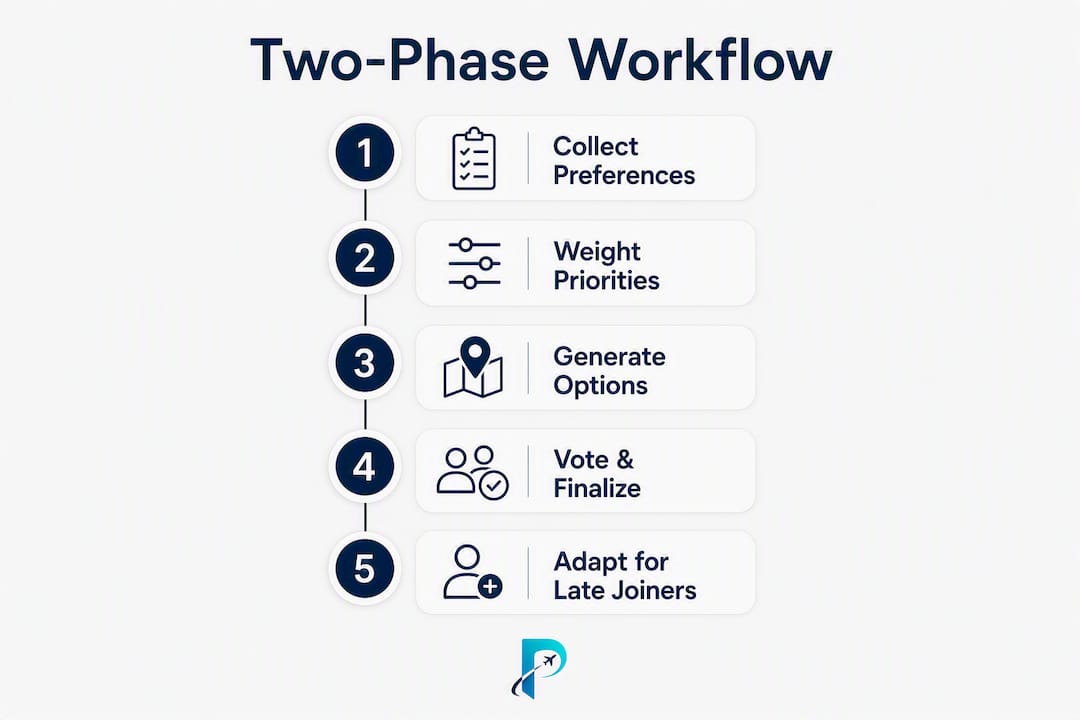
AI does the heavy lifting here. Once preferences and weights are loaded, a good tool generates multiple itinerary options that each represent a different trade-off balance. The group reviews summaries, not raw data, which cuts decision fatigue significantly. A structured capture-then-vote sequence separates preference discovery from option evaluation, so people aren't defending their choices while simultaneously trying to pick a destination.

Late joiners get their own version: AI can generate an alternate plan that slots them in without rebuilding the whole itinerary.
Pro Tip: Before the group call, ask everyone to pre-define their one non-negotiable. Lock those in as constraints before generating options. Then export the finalized itinerary to Google Calendar, Apple Calendar, or Outlook so scheduling friction disappears entirely.
Which features should you look for in a group travel planning tool?
Prioritize these when evaluating any travel coordination software for mixed preferences:
- Multi-user preference forms: every traveler fills in their own inputs, not just the organizer
- Adjustable weighting: hard limits (accessibility, budget caps) rank above soft preferences automatically
- Conflict-resolution voting: built-in ranking or approval voting, no third-party poll needed
- AI personalization: generates day-by-day itineraries tailored to the group's combined profile, including dietary needs and pace
- Offline access: critical when the group is already traveling and connectivity is unreliable
- Calendar export: one-click sync to Google, Apple, or Outlook for every traveler
- Live guidance: real-time advisories and itinerary adjustments while the trip is in progress
- Privacy controls: anonymized notes for health or visa data, explicit consent settings
- Pricing clarity: transparent free tier limits, subscription tiers, and one-off generation credits
- Late-join support: the ability to add a traveler mid-planning without restarting
The three features that most directly prevent deadlocks are weighted scoring, late-join support, and AI-generated compromise summaries. Weighting individual preferences prevents endless veto cycles by making trade-offs visible and fair.
Planytera covers all of these, including AI-simplified family group planning with automated trade-off summaries that reduce planning time.
How do you plan a group trip when everyone wants something different?
Follow this 9-step playbook. For a group of 3–10 travelers, the whole process typically takes one to two hours spread across a few days.
- Invite the group (Day 1, 5 minutes): share the planning tool link and assign each traveler their own preference form
- Set hard constraints (Day 1, 10 minutes): lock in budget caps, accessibility requirements, travel dates, and visa limitations before anyone picks destinations
- Collect preferences (Days 1–3): give everyone 48 hours to fill in diet, pace, interests, and any accessibility notes
- Weight the inputs (Day 3, 10 minutes): the organizer reviews inputs and flags hard limits vs. soft preferences
- Auto-generate options (Day 3, instant): let AI produce 2–3 itinerary options, each reflecting a different trade-off balance
- Summarize trade-offs (Day 3, 15 minutes): share the AI-generated summaries with the group so everyone sees what each option gives up and gains
- Vote (Days 3–4): group members rank options; use weighted tiebreakers if the vote is split
- Finalize and export (Day 4, 10 minutes): lock the chosen itinerary and export to each traveler's calendar
- Assign tasks (Day 4, 15 minutes): divide booking responsibilities (flights, accommodations, activities) based on the finalized plan
Constraint checklist before Step 2:
- Firm travel dates and return deadlines
- Per-person budget cap (not a range)
- Any mobility or dietary hard stops
- Passport validity and visa eligibility for shortlisted destinations
Pro Tip: For groups spanning multiple time zones, schedule the voting call at a time that falls within business hours for the majority. Use a real-time scheduling dashboard to find the overlap window before sending the invite.
When a vote deadlocks, try these tactics in order: apply weighted tiebreakers (the traveler with the hardest constraint gets the deciding vote), rotate decision rights to whoever has been outvoted most recently, or split the itinerary into two sub-group days where preferences diverge. Splitting works especially well for blending different travel paces on multi-destination trips.
What privacy checks matter before using a collaborative AI travel tool?
Verify these before your group shares any personal data:
- Data-sharing defaults: check whether the tool shares preference data with third-party advertisers or partners by default, and opt out if so
- Anonymized notes: health conditions, mobility needs, and visa status should be storable as anonymized inputs, not tied to a public profile
- Calendar export permissions: confirm the tool requests only the minimum calendar access it needs
- Retention policies: find out how long the platform stores your group's preference data after a trip ends
- Acceptable-use policy: review the vendor's acceptable-use policy to understand what the platform can and cannot do with your data
U.S. travelers share more sensitive information in group planning than they often realize: dietary restrictions can reveal religious practices, accessibility notes may disclose medical conditions, and visa status is immigration-sensitive. Explicit opt-in controls and anonymized note fields aren't a nice extra feature. They're the baseline for responsible group planning tools.
Privacy defaults and explicit controls increase adoption among groups that need to share health or visa-sensitive information, because travelers are more willing to fill in complete, accurate preferences when they trust the data won't be misused.
What should you expect to pay for a collaborative AI itinerary planner?
Most AI itinerary tools follow a freemium model. Here's what the typical pricing structure looks like:
- Free tier: limited to one or two trip generations, basic features, no offline access or live guidance
- Monthly subscription: full AI itinerary generation, collaborative features, calendar export, and live guidance; annual plans typically offer a meaningful discount over monthly billing
- One-off generation credits: pay per trip without committing to a subscription, useful for occasional travelers or groups that plan one big trip per year
- Agency or team tier: bulk trip generation, custom branding, and team collaboration tools for travel professionals
Features commonly gated behind paid tiers include offline access, live travel guidance, real-time advisories, and agency bulk tools. Planytera's subscription plans follow this shape, offering both subscription tiers and one-off credits so you can match the model to how often your group actually travels.
Two practical pricing shapes to consider: if your group plans multiple trips per year, a subscription saves money and keeps all itineraries in one place. If you plan one annual trip, a single generation credit is often the better call.
Who benefits most from AI-powered mixed-preference travel coordination?
These traveler profiles get the most out of this approach:
- Multi-generational families: grandparents need accessibility filters and a relaxed pace; teenagers want activity-dense days. Weighted preferences let both coexist in the same itinerary without compromise feeling like a loss.
- Friend groups with mixed budgets: budget-splitting tools and per-person spend caps prevent the awkward moment when one person's dream hotel is another's monthly rent.
- Couples with different travel paces: AI can generate a shared base itinerary with optional add-ons, so the fast-paced traveler and the slow explorer both get their version of the day. Couples travel pace examples show how this works in practice.
- Small leisure travel agents: coordinating multiple clients with different preferences is exactly where AI bulk generation and agency tools pay off.
- Late joiners and multi-destination groups: Iceland group travel trends show how curated, locally-aware options help mixed groups navigate destinations with very different activity profiles. Split itineraries handle the days where the group genuinely wants to do different things.
Key Takeaways
The most effective way to coordinate group travel with mixed preferences is a two-phase AI workflow: collect and weight preferences first, then generate options and vote to finalize.
| Point | Details |
|---|---|
| Two-phase workflow | Collect and weight preferences first, then generate options and vote — this separates discovery from decision-making. |
| Top 5 features to prioritize | Multi-user forms, weighted scoring, AI personalization, offline access, and built-in voting reduce deadlocks. |
| Privacy checks matter | Verify anonymized notes, data-sharing defaults, retention policies, and the vendor's acceptable-use policy before sharing sensitive data. |
| Pricing expectations | Expect a free tier with limited generations; full features require a subscription or one-off generation credits. |
| Try Planytera | Planytera supports the full two-phase workflow with AI personalization, calendar export, offline access, and live guidance. |
Why the two-phase method is the one thing most groups skip
Most group trips stall not because people disagree, but because everyone tries to pick a destination and negotiate preferences at the same time. That's the real problem. Separating preference capture from option evaluation sounds like a small process tweak, but it changes the whole dynamic. When someone sees their accessibility need or budget cap reflected in the AI-generated options, they stop feeling like they're slowing the group down. The two-phase method makes constraints visible and fair, which is why groups that use it actually finish planning instead of abandoning the group chat.
The other thing most articles won't tell you: voting only works if the options are genuinely different from each other. If your AI tool generates three itineraries that are basically the same trip with minor variations, the vote is theater. Push for options that represent real trade-off differences, and the group will make a real decision.
Planytera makes mixed-preference group planning actually work
Planning a group trip with conflicting preferences usually means hours of back-and-forth messages and a spreadsheet nobody updates. Planytera cuts that down to a single workflow: enter your group's preferences, let AI generate personalized day-by-day itineraries, and vote to lock in the plan.
Here's what you get with Planytera:
- AI personalization that factors in diet, pace, budget, and accessibility for every traveler
- Weighted preference inputs so hard limits are respected automatically
- Offline access and live travel guidance once the trip is underway
- Calendar export to Google, Apple, or Outlook in one click
- Editable, shareable itineraries the whole group can see and adjust
- Agency tools for travel professionals managing multiple client groups
Planytera offers a free tier to get started, plus flexible subscription plans and one-off generation credits so you pay for what you actually need. Start planning your group trip today and see how fast a mixed-preference group can go from "we should travel together" to a finalized itinerary everyone's excited about.