
Shared trip documentation prevents errors, speeds decisions, and cuts day-of risk for every traveler in your group. When everyone works from one editable, centralized record, including your itinerary, reservations, passport details, and emergency contacts, you eliminate the version confusion and missed updates that derail even well-planned trips. Platforms like Planytera bring AI-assisted personalization and real-time collaborative editing into a single place, so your group's shared doc stays current without the spreadsheet chaos. Standards like ICAO's passport data requirements and the ESIGN Act's recognition of e-signatures mean your digital records carry real operational and legal weight.
Three outcomes you get right away:
- Fewer day-of surprises. Everyone sees the same confirmed plan, so no one shows up at the wrong terminal.
- Faster group consensus. Real-time editing and comment threads replace long email chains.
- Easier contingency handling. When a flight changes, one update reaches the whole group instantly.
Key Takeaways
Shared trip documentation works because it gives every traveler and coordinator one current, verified source of truth, reducing errors from the planning stage through the last day on-trip.
| Point | Details |
|---|---|
| Start with three core documents | An editable itinerary, a reservations sheet, and an emergency contacts list cover most coordination failures. |
| Follow the verification schedule | Collect documents at 90 days, verify at 60 and 30, confirm at 14, and do a final check 7–10 days before departure. |
| One owner, one tool | Assign a single roster owner and use one platform to prevent version conflicts and scattered information. |
| Protect personal data | Use encrypted uploads, role-based access, and delete sensitive files within 30 days of the trip's end. |
| Planytera as your next step | Planytera's AI itinerary generation, collaborative editing, and offline access map directly to this checklist. |
Table of Contents
- Why shared trip documentation matters for every type of traveler
- What belongs in your shared trip documents
- When and how to verify documents before you leave
- Collaboration features that actually reduce coordination costs
- Best practices for keeping shared docs current and trusted
- Risks and privacy considerations when sharing personal travel documents
- How Planytera makes shared trip documentation easier
- Your copy-ready checklist and minimal shared-doc template
- How group booking workflows stay on track
- Common mistakes that undermine shared trip documentation
- Connecting your shared docs to calendars and travel apps
- Real examples of shared documentation making a difference
- The part most planners skip (and why it costs them)
- Planytera takes the coordination work off your plate
- Sources
Why shared trip documentation matters for every type of traveler
Shared documentation pays off differently depending on who you are, but the core benefit is the same: fewer mistakes, better visibility, and less back-and-forth.
Solo travelers gain a backup. A shared doc with a trusted contact means someone can act on your behalf if your phone dies or you lose a document abroad.
Families and groups get consensus without chaos. Geocollaborative planning tools have been shown to improve group decision quality by scaffolding both task coordination and community bonding, meaning the process of building the shared doc together actually strengthens the trip before it starts.

Travel agents and operators protect their business. Poor document handling causes cancellations, lost revenue, and negative reviews. A centralized system with dashboard status indicators and automated reminders keeps every booking on track.
Pro Tip: Start with just three shared documents: an editable itinerary, a reservations sheet, and an emergency contacts list. Those three alone eliminate the majority of coordination failures.
What belongs in your shared trip documents
The absolute essentials are an editable itinerary, reservation confirmations, passport and visa information, travel insurance details, and emergency contacts. Add a packing list and meeting-point notes for group trips.
Here is a prioritized list of what to include and why:
- Editable itinerary (day-by-day plan with times, addresses, and supplier contacts)
- Reservation confirmations (booking reference, supplier name, check-in/check-out times)
- Passport and visa info (name as on passport, passport number, expiry date, visa type and validity)
- Travel insurance (policy number, coverage dates, emergency claim line)
- Emergency contacts (local embassy, group leader, next of kin)
- Dietary and accessibility notes (per traveler, flagged for each supplier)
- Meeting points (primary and backup, with map links)
| Document | Who provides it | Required metadata | Why it matters |
|---|---|---|---|
| Editable itinerary | Trip coordinator | Dates, times, addresses | Single source of truth for the whole group |
| Reservation confirmations | Each traveler/agent | Booking reference, supplier contact | Proof of booking; needed at check-in |
| Passport/visa info | Each traveler | Name as on passport, expiry, visa validity | Catches name mismatches before departure |
| Travel insurance | Each traveler | Policy number, coverage dates, claim line | Required for medical or cancellation claims |
| Emergency contacts | Trip coordinator | Names, phone numbers, relationship | Enables fast action when something goes wrong |
One firm rule: never share full passport scans through open or public links. Use encrypted uploads with role-based access, and delete sensitive files after the trip ends.
When and how to verify documents before you leave
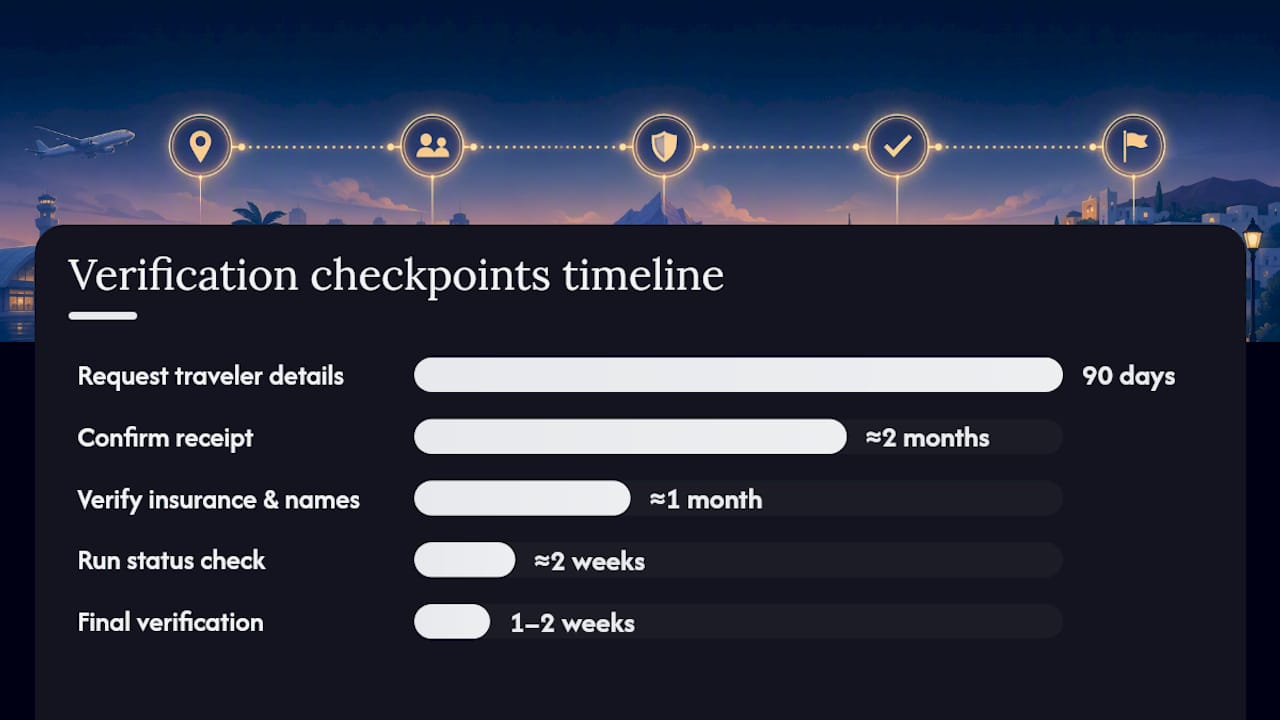
Start collecting documents early and verify on a fixed schedule. The recommended cadence is:
- 90 days out: Send a welcome message and request all traveler details (passport info, dietary needs, insurance policy numbers). Assign a roster owner.
- About two months out, confirm receipt of all documents. Check passport expiry dates (most destinations require six months of validity beyond your return date). Flag any visa requirements.
- About a month before departure, verify insurance coverage dates align with the trip, confirm name matching across bookings, and remind those with missing items.
- Approximately two weeks out, run a full status check, confirm all reservations are active, and distribute the final itinerary link to the group.
- Within one to two weeks before departure, perform final verification to ensure every traveler has reviewed the itinerary, downloaded offline copies, and knows the meeting points.
At each checkpoint, the traveler is responsible for submitting their own documents; the trip coordinator tracks status and follows up; the agency ops team (if applicable) handles supplier confirmations and payment milestones.
Pro Tip: Use a color-coded dashboard (green = complete, yellow = pending, red = missing) so you can see at a glance who needs a follow-up. Automated reminders at each checkpoint capture most travelers without any manual chasing.
Collaboration features that actually reduce coordination costs
The highest-impact features in any shared trip documentation tool are real-time editing, access control, change history, offline sync, and mobile access. Here is what each one does for you operationally:
- Real-time editing means no one works from a stale version. Changes appear instantly for every collaborator.
- Access control lets you give travelers read-only access while the coordinator retains edit rights, preventing accidental overwrites.
- Change history shows who changed what and when, which eliminates version confusion when something looks different from yesterday.
- Offline sync is critical on-trip. Guides and travelers in areas with poor connectivity can still access the full itinerary.
- Mobile access puts the shared doc in everyone's pocket, reducing the need to print or forward documents.
- Structured attachment fields keep passport scans, insurance PDFs, and tickets organized rather than buried in email threads.
Research on AI-enabled co-creation shows that AI-assisted planning reduces choice stress and increases satisfaction without meaningfully increasing the effort travelers perceive. Use AI for drafting itineraries and generating reminders; keep human verification for passport checks and name matching.
A quick feature checklist when evaluating any tool: real-time editing ✓, role-based access ✓, version history ✓, offline mode ✓, mobile app ✓, secure file attachments ✓.
Best practices for keeping shared docs current and trusted
Keep ownership clear, limit edit rights, and treat the shared document as the single source of truth. Scattered information across email, spreadsheets, and messaging apps causes the coordination errors that lead to missed bookings and unhappy travelers.
Operational rules to set from day one:
- Assign one roster owner who controls the master document.
- Use version naming (e.g., "Italy_Trip_v3_June2026") so everyone knows which file is current.
- Define minimum required fields before sharing with the group.
- Require an explicit acceptance step (a reply, a checkbox, or an e-signature) so you know each traveler has reviewed the doc.
Onboarding group members in three steps:
- Share a single link to the document with a one-paragraph explanation of what it contains and what each person needs to add.
- Set a clear deadline for each traveler to complete their section.
- Send one automated reminder 48 hours before the deadline.
Pro Tip: A short 90-second screen-recording tutorial showing group members exactly where to enter their passport details cuts non-adoption almost entirely. Pair it with a mobile push notification and most travelers complete their section the same day.
Risks and privacy considerations when sharing personal travel documents
Sharing personal information is useful but requires controls. Limit access, use secure uploads, and delete sensitive files after the trip.
Key privacy controls to put in place:
- Encrypted file uploads for passport scans and insurance documents.
- Short retention windows: delete personal documents within 30 days of the trip's end.
- Role-based access: travelers see only their own sensitive data; the coordinator sees the full roster.
- Audit logs: track who accessed or downloaded sensitive files.
- Minimal data collection: request only what you genuinely need for the trip.
On the legal side, e-signatures are valid under the ESIGN Act in the U.S., so digital acceptance of a shared document or roster carries real legal standing. For data retention rules in other jurisdictions, consult local counsel.
Pro Tip: For emergency access, designate one trusted contact who holds a decryption key or a sealed physical copy of critical documents. This balances privacy with the practical need to act fast in a crisis.
How Planytera makes shared trip documentation easier
Planytera's combination of AI itinerary generation, collaborative editing, and offline access maps directly to the checklist above. Here is how the features connect to real operational needs:
- AI-generated day-by-day itineraries reduce the planning hours a coordinator spends drafting and revising, freeing time for verification tasks.
- Collaborative editing with role-based access lets the whole group contribute without overwriting each other's work.
- Offline access means guides and travelers can pull up the full itinerary even without a data connection on-trip.
- Real-time travel advisories surface flight changes and local alerts directly in the shared plan.
- Trip journal lets travelers document memories and notes in the same place as the itinerary.
Scenario 1 — Planner at 30 days out: A coordinator uses Planytera to check the status dashboard, sees two travelers have not submitted passport details, and triggers an automated reminder. The gap is closed in 24 hours with no manual follow-up email.
Scenario 2 — Group on-trip with offline access: The group's guide loses cell service in a remote area. Planytera's offline sync means the full day's itinerary, meeting points, and supplier contacts are still available on the device.
Planytera's shared itinerary setup brings AI personalization and real-time collaboration into one place, so your group's documentation stays current from the first planning session through the last day on the road.
Your copy-ready checklist and minimal shared-doc template
Before you lock the itinerary, run through this checklist:
- Editable itinerary created and shared with the group
- All reservation confirmations uploaded with booking references
- Passport expiry dates verified for every traveler (six months beyond return date)
- Visa requirements confirmed for each destination
- Travel insurance policy numbers and coverage dates collected
- Emergency contacts listed (local embassy, group leader, next of kin)
- Dietary and accessibility notes flagged for each supplier
- Meeting points (primary and backup) added with map links
- Final itinerary distributed 7–10 days before departure
Minimal shared-doc template (paste and fill):
- Trip name and dates: e.g., "Portugal Family Trip, June 14–21, 2026"
- Document owner: e.g., "Sarah M. (coordinator)"
- Version: e.g., "v2, updated May 10, 2026"
- Traveler roster: Name | Passport # | Expiry | Dietary notes
- Day-by-day itinerary: Date | Activity | Address | Supplier contact
- Reservations: Booking ref | Supplier | Check-in/out | Confirmation status
- Insurance: Traveler name | Policy # | Coverage dates | Claim line
- Emergency contacts: Name | Relationship | Phone
Pro Tip: Name every version with the trip name, version number, and date (e.g., "Portugal_v3_May2026"). The document owner should be the only person with edit rights to the master file; everyone else gets a comment-only link.
How group booking workflows stay on track
Group tour management requires a workflow-first approach: central trip records, stage-based workflows, itinerary versioning, and automated reminders. Without these, coordination errors multiply as the group size grows.
A practical workflow for group bookings:
- Dashboard status indicators (green/yellow/red per traveler) give the coordinator instant visibility without opening individual files.
- Automated reminders at 90, 60, 30, and 14 days capture most travelers without staff intervention.
- Verification steps at each checkpoint confirm name matching, payment status, and document completeness before the next stage unlocks.
- Itinerary versioning ensures that when a supplier changes a pickup time, only the coordinator updates the master, and the group sees the new version automatically.
Centralized platforms with automatic alerts and audit trails reduce the manual reconciliation that causes most group-travel failures. The goal is to detect missing passports, unpaid balances, and version mismatches early, not the morning of departure.
Common mistakes that undermine shared trip documentation
Most documentation failures come from the same handful of avoidable errors:
- Using multiple tools at once. When the itinerary lives in one app, confirmations in email, and passport details in a chat thread, no one has the full picture.
- Skipping the acceptance step. Sharing a document does not mean everyone has read it. Require an explicit confirmation.
- Ignoring version control. Two coordinators editing different copies of the itinerary and then merging them manually is a recipe for errors.
- Collecting too much data too late. Asking for passport details two weeks before departure leaves no time to fix a name mismatch.
- Leaving sensitive files accessible after the trip. Passport scans and insurance documents should be deleted within 30 days of return.
The fix for all of these is the same: one document, one owner, one tool, and a fixed verification schedule.
Connecting your shared docs to calendars and travel apps
Shared trip documentation works best when it connects to the tools your group already uses. A few practical integration approaches:
- Calendar sync: Export key itinerary dates (flights, hotel check-ins, tours) as calendar events and share the calendar link with the group. Google Calendar and Apple Calendar both support shared calendars with edit or view-only permissions.
- Email and messaging: Use your shared doc as the single reference and link to it in every group message, rather than copying itinerary details into chat threads.
- Travel apps: Platforms that support itinerary app and hotel integration can pull supplier confirmations directly into the shared plan, reducing manual data entry.
- Cloud storage: For file attachments (insurance PDFs, visa copies), link directly from the shared itinerary to a folder with role-based access rather than attaching files to emails.
The key principle: the shared doc is the hub. Every other tool points back to it.
Real examples of shared documentation making a difference
Scenario: The name mismatch caught early. A family of four books flights six months out. The coordinator collects passport details at 60 days and notices one child's ticket is booked under a nickname rather than the legal name on the passport. The airline corrects the name in 48 hours. Without the shared doc and the 60-day checkpoint, this surfaces at check-in.
Scenario: The group that stayed coordinated on-trip. A 12-person tour group travels through three countries. The coordinator uses a shared itinerary with offline access. When a local guide loses connectivity in a rural area, the full day's schedule, supplier contacts, and meeting points are still on the device. The group stays on schedule.
Scenario: The solo traveler with a backup. A solo traveler shares a read-only version of her itinerary and emergency contacts with a family member at home. When her phone is stolen, her family contacts the local embassy using the shared doc's emergency contact list and coordinates with the hotel directly.
These are not edge cases. They are the everyday value of treating shared documentation as a coordination system rather than a filing task.
The part most planners skip (and why it costs them)
Most group trip failures are not caused by bad planning. They are caused by good planning that never made it to everyone in the group. A coordinator spends hours building a detailed itinerary, then shares it once via email, assumes everyone has read it, and moves on. Three weeks later, two travelers have a different version saved on their phones.
The shared document is only as useful as the system around it: a single owner, a fixed update schedule, and a clear signal to the group when something changes. Research on group travel coordination consistently shows that the process of building and maintaining a shared document together improves group cohesion and decision quality, not just operational efficiency. The doc is the coordination system. Treat it like one.
Planytera takes the coordination work off your plate
Planning a group trip means managing a lot of moving parts. Planytera generates a personalized, day-by-day itinerary in minutes, then lets your whole group edit, comment, and access it offline, so the shared doc stays current without anyone chasing updates.

For travel agents, Planytera's agency tools handle bulk trip generation, custom branding, and team collaboration, cutting the hours spent on manual itinerary drafts. For families and groups, the collaborative editing and offline access mean everyone has the right plan, even without a data connection. Whether you're coordinating a weekend getaway or a multi-country group tour, start your first shared itinerary on Planytera and see how much lighter the planning feels. Check out subscription plans to find the right fit for your group size and trip frequency.
Sources
- Travel Documentation Process - Complete Documentation Management 2025
- A framework evaluating geocollaborative portals' impact on travellers’ collaborative decision making
- Common group travel mistakes and how to avoid them
- Group tour management software (workflows, pricing & automation)